

Planning a great party often means juggling dozens of details — invitations, budgets, shopping, and last-minute to-dos. This party planning spreadsheet brings it all together into one organized, easy-to-use Google Sheets template.
Whether you’re hosting a casual birthday party, a baby shower, or a backyard BBQ, this spreadsheet helps you plan every aspect from start to finish. It gives you clear summaries, automatic calculations, and color-coded organization so you can focus on enjoying the event instead of stressing over logistics.
A Complete Overview of the Template
This free Party Planning Spreadsheet is designed with practicality in mind. It includes five interconnected sheets — Party Overview, Guest List, Budget Tracker, Task Checklist, and Shopping List — each with navigation links at the top so you can jump between sections effortlessly.
Everything is color-coded and formula-driven, which means totals, summaries, and progress boxes update automatically. Even if you’re not an advanced spreadsheet user, you’ll find it intuitive and easy to adjust.
For example, as soon as you mark a guest as “Yes” on the Guest List sheet, your total guest count increases automatically in the Party Overview dashboard. When you enter an expense in the Budget Tracker, your total cost adjusts instantly. It’s a small touch, but one that makes a huge difference when you’re keeping track of multiple moving parts.
Explore the Key Features and Sections
Each sheet in this template is designed with a specific role — together they form a simple yet powerful planning system.
Party Overview Sheet

The Party Overview acts as your control center. At the top, there’s a Navigation panel where you can click links to each section of the spreadsheet — Guest List, Budget Tracker, Task Checklist, and Shopping List. This makes it feel like a small dashboard rather than a static file.
On the right side, there’s a clean summary of your main event information:
- Event Name
- Date
- Location
- Theme
- Budget
Beneath that, you’ll find four summary boxes that show real-time totals:
- Guest List Summary – total guests attending and those yet to reply
- Budget Summary – estimated vs. actual cost and total difference
- Task Summary – how many tasks are done, in progress, or not started
- Shopping List Summary – purchased vs. not purchased items and remaining cost
Each box uses color-coding for clarity — blue, green, orange, and red — so you can instantly see what’s on track and what needs attention. For example, if your budget is over, the “Difference” cell will automatically turn bright green or red depending on your balance.
This layout makes it perfect for quick check-ins. You can glance at the Overview sheet the week before your event and instantly know where you stand.
Guest List Sheet
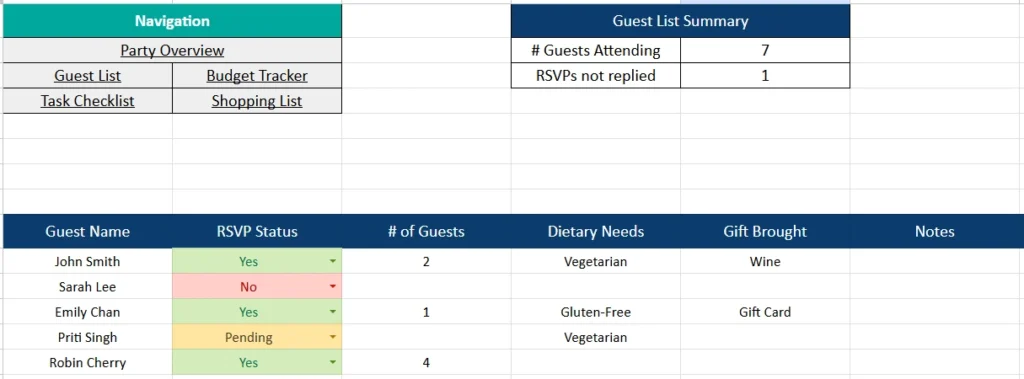
The Guest List sheet is one of the most useful sections for any type of event. It lets you manage RSVPs, track dietary needs, and keep notes on what each guest is bringing or contributing.
The table includes:
- Guest Name
- RSVP Status (dropdown list: Yes, No, Pending)
- Number of Guests
- Dietary Needs
- Gift Brought
- Notes
Conditional formatting adds color to the RSVP column — green for “Yes,” red for “No,” and yellow for “Pending.” That makes it visually clear how your guest list is shaping up.
Above the list is the Guest List Summary box, which automatically counts the total number of attendees and anyone who hasn’t replied yet.
For instance, if you add a family of four marked as “Yes,” the summary adjusts your total guest count to reflect all four. This feature helps you plan food portions, seating, and favors without doing manual math.
Budget Tracker Sheet

Every host knows that parties can go over budget fast — this sheet makes it easy to stay in control.
The Budget Tracker sheet includes:
- Item
- Category (e.g., Food, Décor, Entertainment)
- Estimated Cost
- Actual Cost
- Difference
- Notes
At the top, the Budget Summary box totals all your estimates and actual spending. The “Total Difference” cell automatically calculates whether you’re under or over budget and highlights it in green or red.
For example, if your catering ends up costing $20 more than expected but your décor comes in $5 under, the total adjusts instantly. You can even add new categories, like “Rentals” or “Entertainment,” and the totals will update automatically.
This sheet is especially useful for wedding showers or milestone birthdays where costs can add up quickly. Having the running difference visible helps you make smarter choices before overspending.
Task Checklist Sheet

The Task Checklist keeps your planning process on track by breaking it down into actionable steps.
The table includes:
- Task
- Assigned To
- Due Date
- Status (dropdown list: Done, In Progress, Not Started)
- Notes
The Task Summary box above the list automatically counts how many tasks fall into each category. “Done” turns green, “In Progress” is yellow, and “Not Started” is red.
This color-coded summary helps you see progress at a glance. If you’re co-hosting with friends, each person can add their name in the “Assigned To” column to stay accountable.
For example, one host might handle decorations while another takes care of food orders. The status updates make it easy to track responsibilities without needing a separate project tool.
Shopping List Sheet
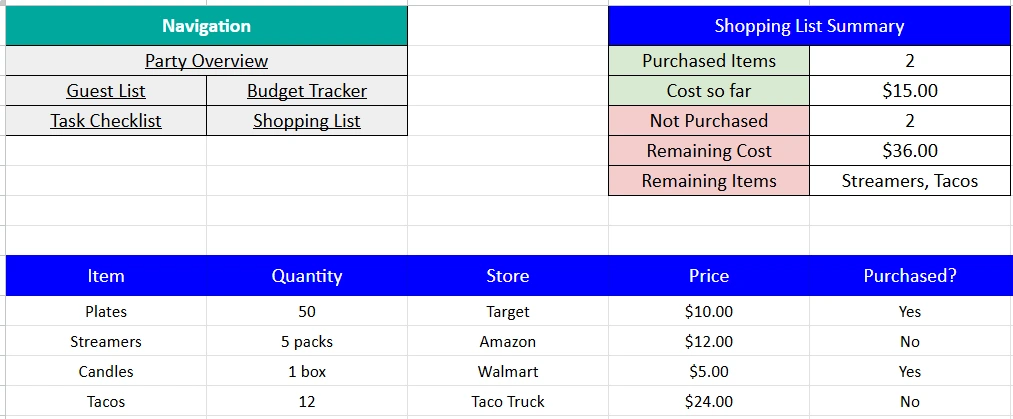
Finally, the Shopping List sheet keeps track of all the supplies you need to purchase.
The table includes:
- Item
- Quantity
- Store
- Price
- Purchased? (Yes/No dropdown)
The Shopping List Summary box at the top calculates how many items are purchased, how many remain, and how much they’ll cost. It even lists any remaining items by name so you won’t forget last-minute essentials like candles or snacks.
For example, if two of your four listed items are purchased, the summary automatically updates the remaining total and highlights the missing ones. This makes grocery and décor shopping much more efficient.
Step-by-Step: How to Use the Template
- Set Up the Overview
Fill in your event name, date, theme, and total budget. The summary boxes will stay empty until you add details to other tabs. - Add Guests
Go to the Guest List sheet and start listing your attendees. Use the dropdown menus for RSVP Status to keep things tidy. - Plan Your Budget
Enter your estimated and actual costs in the Budget Tracker. Watch your totals and differences calculate automatically. - Assign Tasks
In the Task Checklist, list what needs to be done and assign people to each item. Update the status as you progress. - Prepare Your Shopping List
Track what you’ve bought and what’s left to purchase. The remaining cost will update automatically. - Monitor Your Progress
Return to the Party Overview sheet anytime to see your live dashboard of totals, RSVPs, tasks, and expenses.
Why This Template Stands Out
This party planning spreadsheet isn’t just a collection of tables — it’s a structured tool built to help you actually manage an event efficiently.
- Visual design for clarity: Each section uses coordinated colors (blue, orange, green, and purple) for fast scanning.
- Smart summaries: All key metrics — guests, budget, tasks, and shopping — update automatically.
- Flexible for any occasion: Works equally well for birthdays, office parties, graduation celebrations, or holiday dinners.
- Collaboration-friendly: Share it with friends or family so everyone can edit in real time.
- Google Sheets convenience: Access it anywhere from phone or laptop, without installing software.
Many event planners and even small business owners use it to coordinate client events or community gatherings because it’s simple, shareable, and effective.
Get Your Free Party Planning Spreadsheet
- Free Template
- Fully Editable
- Instant Access
- Organize your information
How to Access Your Copy
- Enter your email for instant access
- Open the link we send you
- Start using the spreadsheet right away
Stay organized, stay under budget, and most importantly — enjoy your party knowing everything’s taken care of.





