
Managing petty cash is one of those tasks that seems simple until it isn’t. Small cash purchases add up quickly, receipts go missing, and before long, no one is quite sure how much cash should be in the drawer. That’s exactly the problem this Petty Cash Spreadsheet is designed to solve.
This Google Sheets petty cash template provides a structured, reliable way to track small cash transactions while maintaining a clear running balance at all times. It combines a clean transaction log with a built-in summary section, making it easy to see both the details and the big picture in one place. Whether you’re running a small business, managing an office, overseeing a school department, or handling cash for a nonprofit, this spreadsheet helps you stay organized and accountable.
Unlike basic lists or handwritten logs, this template automatically calculates totals and balances for you. You enter the numbers once, and the sheet does the rest. The result is a petty cash system that’s simple enough for daily use but accurate enough for reviews, audits, or month-end reconciliation.
Key Features and Sections
This petty cash spreadsheet is intentionally built as a single-sheet system. Everything you need is visible without switching tabs, which reduces errors and makes the template easier for beginners to use.
Reporting Period Section
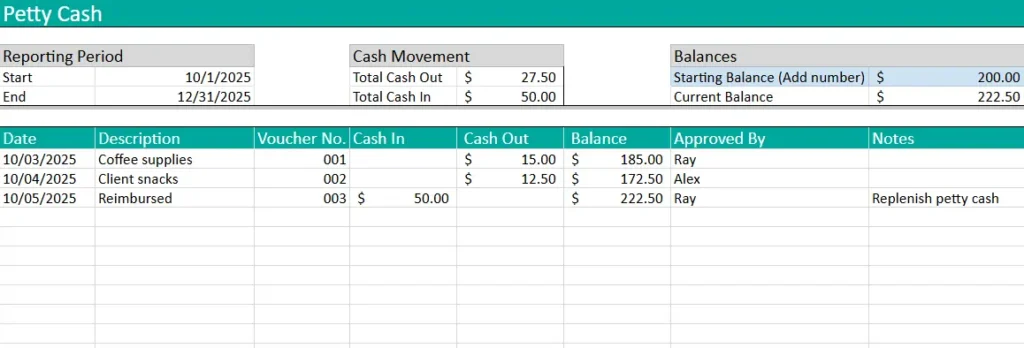
At the top of the sheet, you’ll find the Reporting Period area. This section allows you to define the start and end dates for the petty cash log, such as a month, quarter, or custom time range.
This is especially useful for:
- Monthly office expense tracking
- Quarterly reviews for management
- Matching petty cash records to accounting periods
By clearly defining the reporting period, the spreadsheet becomes easier to archive and compare over time. You can simply duplicate the sheet for a new period and update the dates.
Cash Movement Summary
Next to the reporting period is the Cash Movement summary. This section automatically displays:
- Total Cash Out
- Total Cash In
These totals are calculated directly from the transaction log below. This gives you an immediate overview of how much petty cash has moved during the selected period without needing to filter or manually add anything.
For example, an office manager can quickly see how much cash was spent on supplies versus how much was replenished during the month, all without scrolling through rows of data.
Balances Section
The Balances section is one of the most important parts of the template. It includes:
- Starting Balance (entered manually)
- Current Balance (calculated automatically)
The starting balance acts as the foundation for the entire sheet. Once entered, all transaction balances flow from that number. The current balance is dynamically calculated by referencing the latest balance in the transaction log, ensuring it always reflects the most up-to-date cash position.
This setup eliminates guesswork. At any moment, you can look at the balances section and know exactly how much petty cash should be on hand.
Petty Cash Log Table
The main body of the spreadsheet is the Petty Cash Log table. This is where all transactions are recorded in detail.
Each column has a clear purpose:
- Date: When the transaction occurred
- Description: What the cash was used for or received from
- Voucher No.: A reference number tied to a receipt or voucher
- Cash In: Money added to petty cash
- Cash Out: Money spent from petty cash
- Balance: Automatically updated running total
- Approved By: Person who authorized the transaction
- Notes: Any additional context or explanation
The running balance column is prefilled down the sheet, which ensures the current balance is always available—even if future rows haven’t been used yet. This design choice keeps the summary balance accurate and prevents errors caused by blank cells.
How to Use the Template
Using the petty cash spreadsheet is straightforward, even if you don’t consider yourself “good with spreadsheets.”
Start by entering your Starting Balance in the balances section at the top. This should match the actual cash you have on hand at the beginning of the period.
Next, confirm the Reporting Period dates so the sheet clearly reflects the time frame you’re tracking.
When a transaction occurs, add a new row to the petty cash log:
- Enter the date and description
- Assign a voucher or receipt number
- Record the amount in either Cash In or Cash Out (never both)
- Add approval and notes if applicable
The balance column updates automatically based on the previous row, so there’s no need to calculate anything manually. The cash movement totals and current balance update instantly as well.
For example, if an employee purchases coffee supplies for $15, you simply enter $15 in the Cash Out column. The spreadsheet immediately reduces the running balance and updates the total cash out figure.
When petty cash is replenished, record the amount in the Cash In column. The sheet treats this just like a transaction, maintaining a clear and auditable history of all cash movement.
Why Choose This Template
This petty cash spreadsheet is designed with real-world use in mind. It balances simplicity with structure, making it suitable for both everyday tracking and more formal recordkeeping.
One major advantage is clarity. At any time, you can answer three critical questions:
- How much petty cash did we start with?
- What has been spent or added?
- How much cash should we have right now?
The template is also flexible. It works equally well for:
- Small businesses managing office expenses
- Schools tracking departmental cash
- Churches and nonprofits handling small reimbursements
- Freelancers or contractors who still use cash occasionally
Because it’s built in Google Sheets, it’s easy to share, duplicate, and store securely online. You can restrict editing access, keep everything cloud-based, and avoid losing records.
Most importantly, this template reduces mistakes. Automatic calculations, a structured layout, and a clear approval trail all help prevent common petty cash problems like missing funds, unclear transactions, or incomplete records.
Get Your Free Petty Cash Spreadsheet
- Free Template
- Fully Editable
- Instant Access
- Organize your information
How to Access Your Copy
- Enter your email for instant access
- Open the link we send you
- Start using the spreadsheet right away





