
In a world where every missed call can mean a lost opportunity, having a reliable system to record, track, and manage phone interactions is essential. Whether you’re a business owner, sales representative, or customer service professional, this free Phone Log Template for Google Sheets helps you keep every detail organized — from call type and duration to lead status and next steps.
Built with simplicity and practicality in mind, this spreadsheet transforms a basic call list into a lightweight CRM system you can customize for your own workflow. Below, we’ll explore how it works, what makes it useful, and how you can start using it instantly.
Understand Your Call Data at a Glance
Overview of the Template
The Sheetrix Phone Log Template is designed for clarity and usability. It features two connected sheets:
- The main Phone Log sheet where you record all your calls.
- The Lists sheet that powers dropdown menus and keeps your options standardized.
The design is straightforward — every column has a clear purpose, and every dropdown ensures consistency. With automatic summaries and easy filtering, you can instantly see how many calls you’ve made, which ones were inbound or outbound, and which resulted in a sale.
Who it’s for:
- Sales teams who need to track outreach and follow-ups.
- Customer service agents logging client calls or issues.
- Freelancers and small business owners managing client communication.
- Administrative staff who need a call record for internal tracking.
By keeping everything in Google Sheets, you don’t need any special software or subscriptions. Just make a copy, and you’re ready to start.
Explore Every Part of the Template
Phone Log Sheet
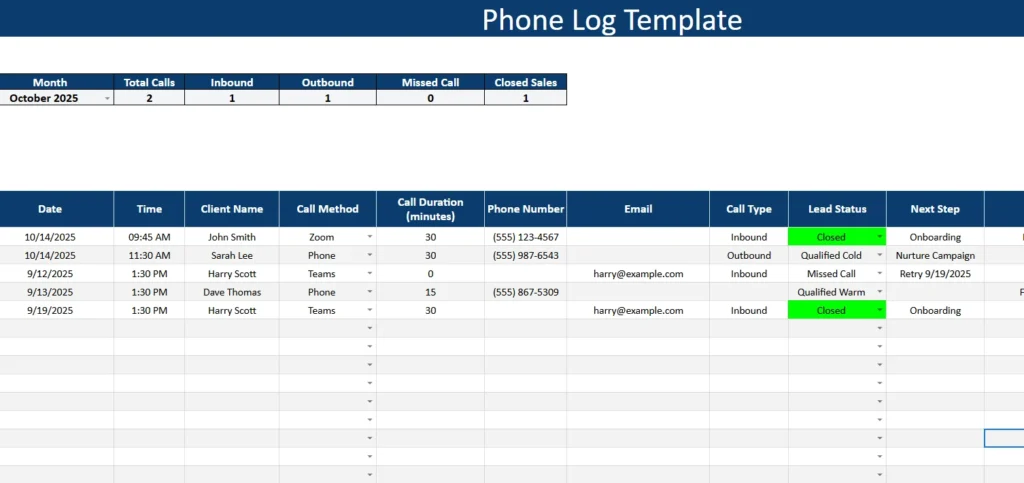
The Phone Log sheet is where the day-to-day action happens. Each row represents one call, and the layout guides you naturally through all the important details:
- Date and Time – Record when each call took place. This helps you monitor activity patterns and identify your busiest times.
- Client Name – Keep track of who you spoke with, whether it’s a lead, a customer, or a colleague.
- Call Method – Choose between options like Phone, Zoom, Teams, or Meet to record how the conversation happened. This is especially useful for remote or hybrid teams who use multiple platforms.
- Call Duration (minutes) – Enter how long the call lasted. Sales reps often use this to measure engagement levels or calculate time spent per lead.
- Phone Number and Email – Keep both contact fields handy so you can reach out by phone or follow up with an email.
- Call Type – Use the dropdown to mark whether the call was Inbound (they called you) or Outbound (you called them).
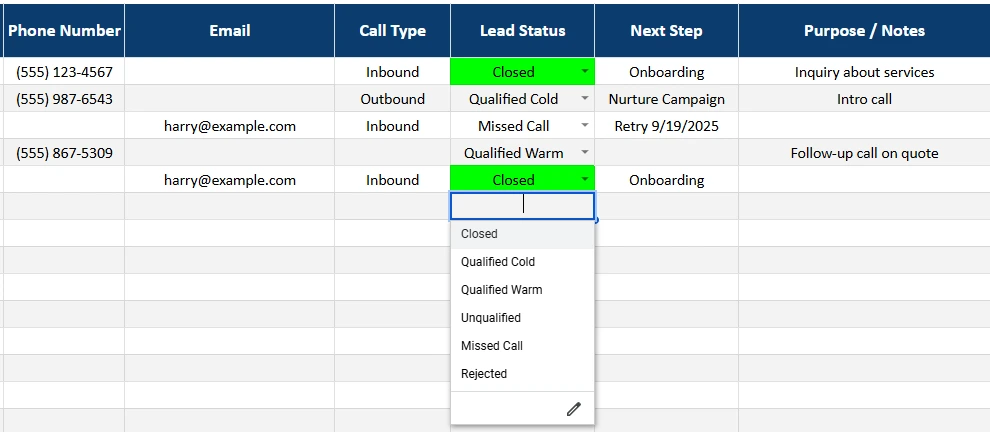
- Lead Status – A dynamic dropdown that helps you categorize where each contact stands in your sales or service process.
Examples include:- New — freshly added contact or first interaction
- Qualified Warm — ready for a proposal or demo
- Qualified Cold — interested but not yet ready to buy
- Unqualified — not a match for your service
- Missed Call — call attempt with no response
- Closed — successful sale or completed outcome
- Next Step – Define the follow-up action, such as Send proposal, Schedule demo, Follow up next week, Nurture campaign, or Onboarding.
- Purpose / Notes – Use this section for key details or context. For example, “Asked for a quote,” “Needs contract revision,” or “Waiting for budget approval.”
- Follow-up Date – Set the date for your next contact. You can easily filter by date to see what’s due today or later this week.
At the top of the sheet, a summary box gives you automatic totals:
- Total Calls
- Inbound and Outbound Calls
- Missed Calls
- Closed Sales
This helps teams get a quick performance snapshot without creating extra formulas.
Lists Sheet
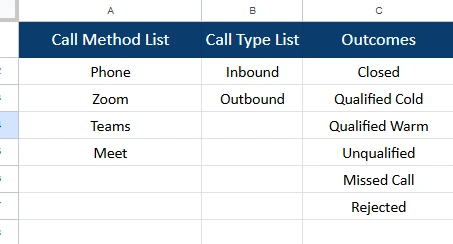
The Lists sheet keeps all dropdowns organized. It’s a behind-the-scenes helper that ensures your data stays clean and consistent. You can edit these lists anytime — for example, adding new communication methods or custom lead statuses.
Here’s what’s included by default:
- Call Method List: Phone, Zoom, Teams, Meet
- Call Type List: Inbound, Outbound
- Outcomes (Lead Status): Closed, Qualified Cold, Qualified Warm, Unqualified, Missed Call, Rejected
You can expand or rename these values to match your specific workflow. If your business tracks leads differently, you might add categories like Demo Scheduled or Proposal Sent.
Turn Calls Into Action
How to Use the Template
Using the Sheetrix Phone Log Template takes only a few minutes to learn — but once you start, it quickly becomes part of your daily routine.
- Make a Copy: Open the Google Sheets link.
- Start Logging Calls: After each conversation, fill out a new row with the call’s details — date, time, contact, method, and notes.
- Use Dropdowns: Select options for Call Method, Call Type, Lead Status, and Next Step to keep entries consistent and easy to filter later.
- Review Your Month: Use the summary box to analyze total calls, conversion ratios, and which methods perform best.
- Follow Up On Time: Filter by Follow-up Date to see which clients need attention.
- Customize Lists: Adjust dropdowns on the Lists sheet to fit your business. You might add new statuses like Negotiation or Pending Contract.
The best part? Everything updates automatically. The built-in formulas calculate totals, and conditional formatting highlights closed leads or overdue follow-ups for quick visibility.
Simplify Call Management and Lead Tracking
Why This Template Works
Many teams rely on expensive CRM systems to log calls and track prospects, but not everyone needs that complexity. This Google Sheets Phone Log Template delivers the essential features of a CRM — contact tracking, status updates, next steps, and summaries — in a lightweight, shareable format.
Here’s what makes it stand out:
- Visual Clarity: Alternating colors and dropdowns make it easy to read and error-free.
- Team Collaboration: Multiple team members can use the same sheet simultaneously through Google Drive.
- No Learning Curve: Anyone familiar with spreadsheets can start using it immediately.
- Adaptable for Any Role: Sales teams use it to track pipelines, virtual assistants use it for client logs, and small business owners use it for customer support records.
- Accessible Anywhere: Whether you’re on your laptop or phone, you can view and edit it from Google Sheets.
Example Use Case:
Imagine you run a small marketing agency. Each call — whether from a referral, cold outreach, or current client — gets logged in this template. The Lead Status and Next Step fields help your team stay aligned: one person might need to send a proposal, another might have to schedule a discovery call. The summary section gives you instant insights into how many deals are in progress and how many have closed.
In short, it bridges the gap between a simple spreadsheet and a powerful CRM.
Start Tracking Smarter Today
Get Your Call Log Spreadsheet
- Free Template
- Fully Editable
- Instant Access
- Organize your information
How to Access Your Copy
- Enter your email for instant access
- Open the link we send you
- Start using the spreadsheet right away
Pro tip: Add a “Closed Sales” counter at the top of your version to measure success month by month. Over time, you’ll have a complete record of every lead, client, and conversation — all searchable and easy to analyze.
Final Thoughts
The Sheetrix Phone Log Template combines the organization of a CRM with the simplicity of a spreadsheet. It’s flexible, transparent, and practical — built for people who want a smarter way to manage calls without relying on expensive tools.
Whether you’re tracking outbound sales, customer service interactions, or client meetings, this Google Sheets template keeps your entire communication history in one place. With dropdowns, summaries, and follow-up reminders, it’s more than just a log — it’s your personal command center for staying connected and productive.
So why wait? Get it today, customize it for your workflow, and start turning every call into an opportunity.





