
If you’re serious about improving your pickleball game, tracking your matches and performance is one of the best ways to see progress. The Pickleball Spreadsheet by Sheetrix helps players organize every detail — from match scores and practice sessions to win percentages and partner stats — in a simple, interactive spreadsheet you can use in Google Sheets or Excel.
Whether you’re part of a local league, play with friends each weekend, or just want to analyze your singles and doubles results, this spreadsheet provides a professional and easy-to-use way to understand your strengths and areas for growth. It’s not just a log — it’s a personal performance dashboard built for players who want to take their game seriously.
Understand Your Game with the Pickleball Tracker
The Pickleball Spreadsheet is a single-player performance tracker designed to record matches, calculate stats, and visualize your progress. Unlike complicated score apps or manual notebooks, everything here happens automatically through spreadsheet formulas and dropdowns. You enter your data once, and the rest of the sheets update in real time.
Each tab in the file focuses on one part of your game: matches, partner and opponent stats, practice logs, and gear tracking. The setup is simple enough for beginners but powerful enough for competitive players who want a season-long record of their results.
Below is a breakdown of each section and how it works.
Explore the Sheets Inside the Pickleball Spreadsheet
Matches Sheet
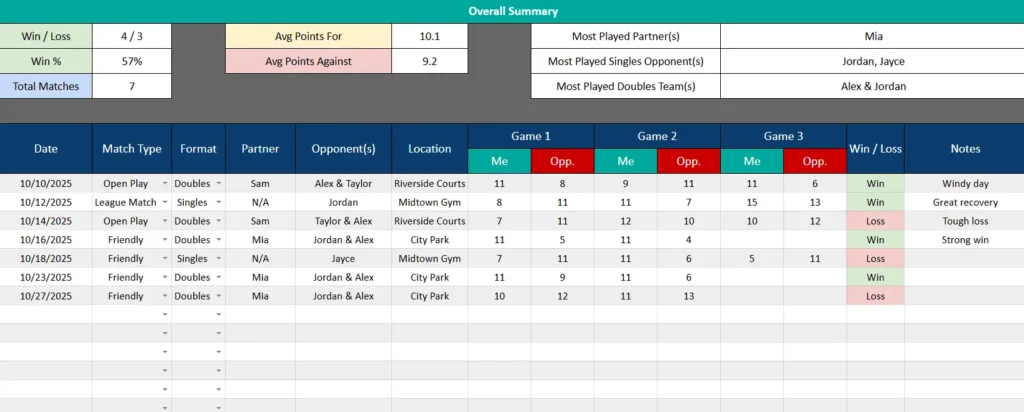
The Matches sheet is the heart of the template. It’s where you record every match you play — whether singles, doubles, league, or open play. Each row represents one match, and includes dropdowns for session type and format, plus spaces to enter your partner, opponents, location, and game scores.
For example, if you play a friendly doubles match with Mia against Alex and Jordan at City Park, you can log the three game scores (like 11–5, 11–4, 11–9) and your notes, such as “Strong serves today.” The Win / Loss column fills in automatically based on the scores you enter.
Green highlights mark wins, and red highlights show losses, giving you an instant visual record of performance over time. Even if you play best-of-three matches, the sheet adds up wins correctly and calculates your win streaks with ease.
The format options are fully editable. You can rename them, add your own court locations, or insert new columns if you want to track extra stats like unforced errors or serve aces.
Singles / Doubles Stats Sheet
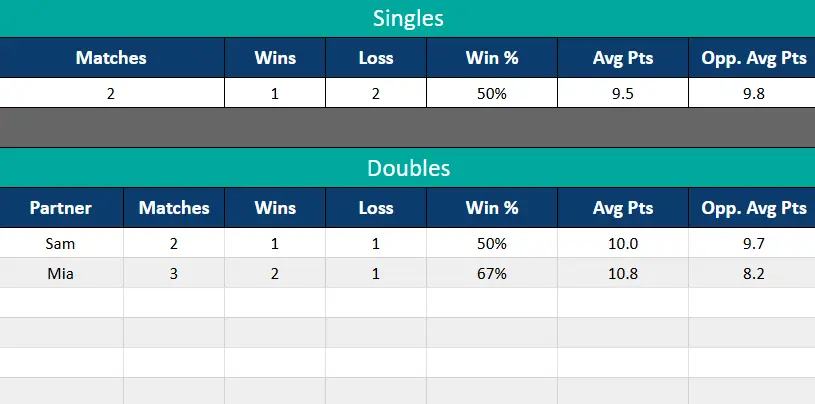
The Singles / Doubles Stats sheet automatically compiles all of your match data into summaries. It separates singles and doubles results so you can see exactly how you perform in each format.
The singles section shows:
- Total matches played
- Wins and losses
- Win percentage
- Average points scored and conceded
The doubles section goes a step further by analyzing results with each partner. You can quickly see which teammates you play best with. For example, if you have a 67% win rate with Mia and 50% with Sam, the numbers give you insight into which partnerships are most effective. This makes it ideal for league play, where partnerships can change throughout the season.
Opponent Stats Sheet
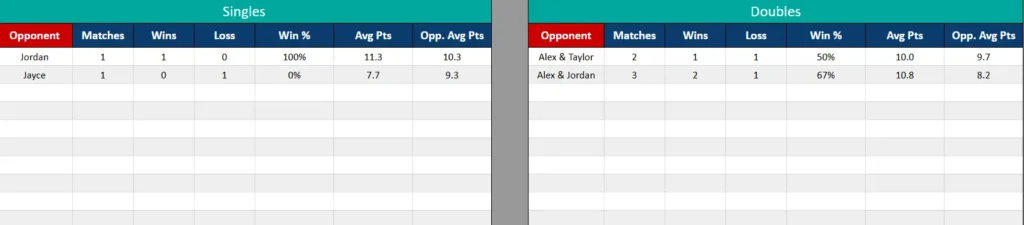
The Opponent Stats sheet helps you evaluate your match history against specific players or doubles teams. It separates singles opponents from doubles opponents and calculates your win rate, average points scored, and points allowed for each.
This is particularly useful if you regularly face the same players. For instance, if you’ve faced Jordan twice in singles and won once, you’ll immediately see your 50% record against them. For doubles, you might see that you’ve beaten Alex and Jordan two out of three times. Over time, these stats help you recognize patterns in your game — such as opponents who consistently challenge your playstyle.
Practice Log Sheet
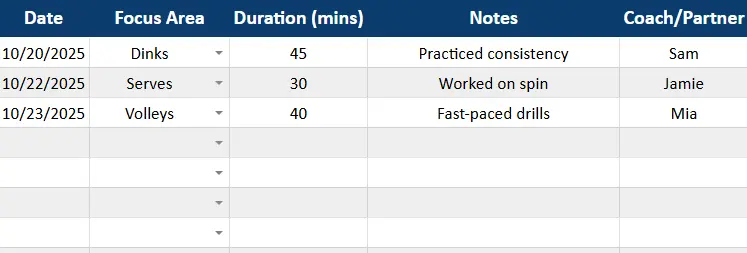
The Practice Log is a simple yet valuable addition for any player looking to improve specific skills. You can select a Focus Area (like Dinks, Serves, or Volleys) from a dropdown, log the duration of practice, and add notes on what you worked on.
For example, if you spent 45 minutes on dinks and 30 minutes practicing serves, you can note progress like “Improved placement” or “Need to focus on consistency.”
This sheet turns your casual practice sessions into measurable training data. When combined with your match stats, you can clearly see if focused drills are paying off in real games.
Gear Tracker Sheet
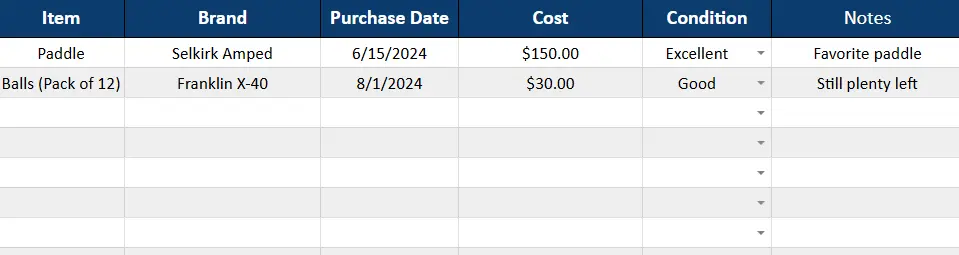
Pickleball gear can make a big difference in your comfort and performance, so this sheet helps you keep it organized. You can track paddles, balls, shoes, or accessories, noting purchase dates, costs, and current condition using dropdown options like Excellent, Good, or Replace Soon.
For example, you might log a Selkirk Amped paddle bought for $150 in June, mark it as Excellent, and note that it’s your favorite paddle. Over time, this helps you manage your equipment budget and plan replacements before tournaments or seasons start.
Lists Sheet
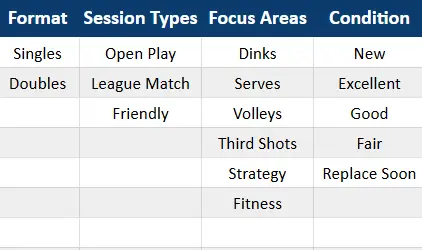
The Lists sheet powers all dropdown menus throughout the template. It contains editable options for formats, session types, focus areas, and gear conditions.
You can add new categories here — such as “Tournament” as a session type or “Footwork” as a new practice focus area — and they’ll instantly appear in your dropdowns across the file. This makes the template fully customizable without touching any formulas.
How to Use the Pickleball Spreadsheet
Using the template is easy. Here’s how to set it up:
- Start logging your matches. Each new row represents a game session. Enter your data, and the summary stats update automatically.
- Check your stats anytime. Review your singles vs. doubles records, opponent histories, and improvement trends.
- Update practice sessions and gear as needed. These sections are optional but add valuable insights if you train regularly.
You don’t need advanced spreadsheet skills — everything is built-in and runs automatically. The only formulas you’ll notice are those generating summaries in the background.
Here’s a realistic example of how a player might use it:
- Alex, a 4.0-level player, uses it to track local league results and see how his win rate changes with different partners.
- Jamie, who’s new to the sport, logs every session and uses the Practice Log to build better consistency.
- Mia, a doubles player, uses the Opponent Stats sheet to track who she struggles against before tournaments.
Each of these players can rely on the same spreadsheet to store data, visualize progress, and stay motivated throughout the season.
Why the Pickleball Tracker Stands Out
There are plenty of sports tracking apps, but very few cater specifically to pickleball — and even fewer give players this level of control.
With the Sheetrix Pickleball Spreadsheet, you can:
- Track both singles and doubles seamlessly
- See automatic summaries without extra setup
- Customize dropdowns for your play style
- Log practice sessions and training focus areas
- Maintain a record of gear, costs, and replacements
Unlike an app, you keep full ownership of your data. You can share it with teammates, export it for stats analysis, or even print it out before tournaments.
The design is also intentionally simple. Blue header bars, alternating row colors, and bold summary boxes make it look professional but easy to read, even on a phone or tablet.
Get Your Free Pickleball Spreadsheet
- Free Template
- Fully Editable
- Instant Access
- Organize your information
How to Access Your Copy
- Enter your email for instant access
- Open the link we send you
- Start using the spreadsheet right away
Start logging your first matches today and watch your stats come to life.
With consistent tracking and honest reflection, you’ll not only see your improvement — you’ll feel it every time you step onto the court.





