Hosting a potluck sounds simple—until you realize five people are bringing desserts, nobody signed up for beverages, and you forgot to track who’s bringing utensils. That’s exactly why a well-designed potluck signup sheet is essential.
This free Google Sheets Potluck Signup Sheet Template from Sheetrix helps you coordinate every detail of your event in one place. It’s easy to share, easy to update, and built to give you a clear overview of who’s bringing what, how many people have signed up, and what food categories still need coverage. Whether you’re organizing a neighborhood cookout, an office lunch, or a family picnic, this template will save you time and stress while keeping everything organized.
A Simple Overview of the Potluck Signup Sheet Template
This Potluck Signup Sheet is a ready-to-use spreadsheet built in Google Sheets that lets participants enter what dish they’re bringing, what category it falls under, and any dietary details or notes. The template has been refined for real-world use—based on common pain points hosts encounter when collecting information from guests.
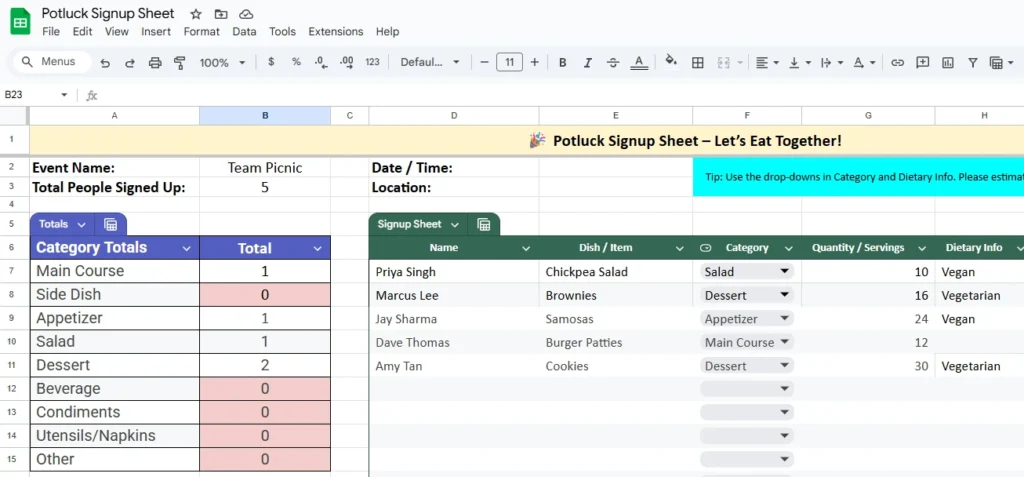
At the top of the sheet, there’s a clear event summary area that includes:
- Event Name (e.g., “Team Picnic” or “Friendsgiving Dinner”)
- Date and Time
- Location
- Total People Signed Up (automatically calculated)
Next to this is a colorful Category Totals dashboard, which instantly shows how many dishes have been signed up in each category. For instance, you might see:
- Main Course: 2
- Salad: 1
- Dessert: 3
- Beverage: 0
This quick glance helps you spot missing items right away so you can remind participants to fill the gaps.
The lower section of the sheet is the main Signup Table, where each guest enters their details. It includes drop-down menus for categories and dietary preferences, making it consistent and easy to read. Each category is color-coded so you can instantly tell which types of dishes are covered.
The sheet’s structure is simple but powerful, making it just as useful for a small get-together as it is for large community or corporate events.
A Closer Look at the Key Features and Sections
Every part of this Potluck Signup Sheet serves a clear purpose. Here’s what makes it so effective:
Event Details Section
Located at the top, this section keeps the key information—event name, date, and location—visible to everyone. You can easily customize it for any gathering, such as:
- “Company Holiday Luncheon”
- “Neighborhood BBQ”
- “Church Community Potluck”
The total count formulas automatically update as new names are added, giving you an instant overview of attendance and participation.
Category Totals Chart
This is one of the most practical features. Each category, such as Main Course, Side Dish, Salad, Dessert, Beverage, or Condiments, automatically counts how many dishes fall into it. The totals update in real time as participants use the dropdown menu in the “Category” column.
For example, if two people choose “Dessert,” the total under Dessert immediately changes to 2. If no one signs up for “Beverage,” the cell remains at 0 and is highlighted in red so you can easily notice what’s missing.
Signup Table
This is where the collaboration happens. The table includes the following columns:
- Name: Each participant lists their name.
- Dish / Item: They describe what they plan to bring, such as “Macaroni Salad” or “Lemon Bars.”
- Category: A dropdown list keeps categories consistent.
- Quantity / Servings: Lets you estimate how many guests each item will serve.
- Dietary Info: Dropdown options include Vegan, Vegetarian, Gluten-Free, Dairy-Free, and more.
- Notes: Space for allergy details or preparation notes, like “contains nuts” or “keep refrigerated.”
- Contact Info: Optional email or phone number for coordination.
Each row is color-coded based on the selected category, giving the sheet a clean and visual structure. It makes it easy to scan at a glance and see whether your potluck is balanced or skewed toward certain dish types.
Instruction Banner
To guide users, a highlighted tip section appears right above the table:
“Use the drop-downs in Category and Dietary Info. Please estimate servings. Add ingredients or allergy notes in the Notes column.”
This clear instruction ensures even first-time spreadsheet users understand how to fill it out correctly.
Step-by-Step Guide: How to Use the Potluck Signup Sheet
- Fill in Event Information:
Add your event name, date, and location at the top. The formulas for total attendees and category counts are already built in. - Share the Sheet with Participants:
Click Share → Anyone with the link can edit in Google Sheets. Send this link by email or group chat so guests can sign up themselves. - Track Dishes in Real Time:
As people add their names and dishes, the Total People Signed Up and Category Totals sections update automatically. You’ll quickly see if too many desserts or not enough main dishes are listed. - Adjust as Needed:
You can expand the dropdown lists, add more categories (like “Snacks” or “Grill Items”), or protect certain cells to prevent accidental edits. - Print for Event Day:
Once the list is complete, print it as a checklist to use during setup or cleanup. It’s formatted to look clean and readable on paper too.
Why This Template Is Worth Using
A potluck spreadsheet may seem simple, but the right design makes a big difference. This Sheetrix version is crafted for clarity, collaboration, and reliability—qualities that generic templates often overlook.
Real-World Usability
Many hosts have tried coordinating by email or messaging apps, only to lose track of who’s bringing what. This spreadsheet fixes that problem. Everyone sees the same list, updates happen instantly, and confusion disappears.
Time-Saving Automation
The built-in formulas handle totals and category counts automatically. There’s no need for manual tracking, which means less work for the organizer.
Ideal for All Kinds of Events
This Potluck Signup Sheet isn’t limited to food. You can adapt it for:
- Office parties where people bring supplies instead of dishes
- School events with signups for snacks or decorations
- Holiday gatherings where families bring traditional meals
- Community fundraisers tracking food donations
It works equally well for small or large groups—whether five coworkers or fifty families.
Easy Customization
Since it’s in Google Sheets, anyone can duplicate and modify it without needing special software. You can add branding for your company, include new columns (like RSVP status), or connect it with Google Forms to collect signups automatically.
Get Your Free Potluck Signup Spreadsheet
- Free Template
- Fully Editable
- Instant Access
- Organize your information
How to Access Your Copy
- Enter your email for instant access
- Open the link we send you
- Start using the spreadsheet right away
If you’re looking for a clean, reliable, and practical solution for organizing food contributions, this Potluck Signup Sheet is exactly what you need. It’s free, shareable, and built to make your next gathering a success—no more duplicate dishes or missing essentials.