Keeping your pricing organized and consistent is essential for any business. Whether you run a small retail shop, manage a service-based company, or freelance online, having a professional and accurate price list can save you time and help clients understand your offerings instantly.
This free price list spreadsheet template from Sheetrix is designed to make that process simple. It’s built in Google Sheets and downloadable as an Excel file, so you can use it anywhere — on desktop, tablet, or mobile. The template combines functionality, clean design, and automation to handle your item pricing, tax calculations, and totals effortlessly.
A Clear Overview of the Template
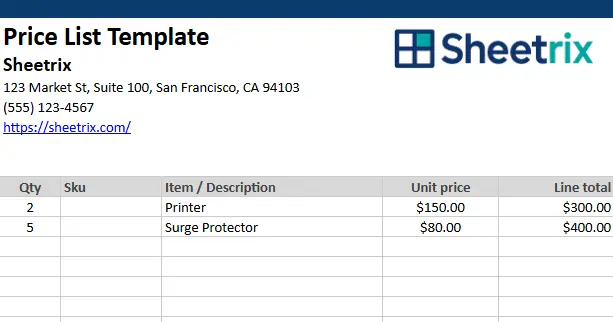
At its core, the price list template gives you a structured and professional way to display all your products or services along with their prices, quantities, and totals. It’s set up to calculate line totals, tax, and the final balance automatically.
The layout is divided into three main sections:
- Company Information and Branding Header
- Itemized Product or Service Table
- Automatic Totals and Summary Section
Each part is designed to be easy to edit and visually balanced — whether you’re printing it, sending it to a customer, or using it as a working document for your team.
You’ll also find a separate sheet for tax rate setup, which makes it easy to adjust your local sales tax without editing any formulas in the main sheet. Once you change the tax rate there, your totals update automatically in the summary area.
Key Features and Template Sections
This template is straightforward enough for beginners yet detailed enough for professionals. It includes carefully chosen columns and formulas that make daily price updates quick and reliable.
Price List Sheet
This is the main sheet — the one you’ll use most of the time. It includes all the essential pricing fields you need in a well-organized table.
Columns included:
- Qty: Number of items or hours of service.
- Item / Description: Product name or service title, with space for details.
- Unit Price: The cost per unit, piece, or hour.
- Line Total: Automatically multiplies quantity by unit price to give you the total cost for that line.
Below the main table, you’ll find a clean summary section that includes formulas for:
- Subtotal – sum of all line totals.
- Discount – a manual entry if you’re offering price reductions.
- Tax – calculated automatically based on the rate in the second sheet.
- Shipping – optional field for delivery or handling fees.
- Total Due – adds it all up into one easy-to-read total.
- Amount Paid and Balance Due – useful if you’re sending quotes or invoices and want to track payments.
Tax Rate Sheet
Instead of entering tax manually every time, this sheet contains a single editable cell where you can input your tax rate — for example, 7.5% or 9.25%. The main price list pulls this value automatically, so when you change it once, every total in the file updates instantly.
This separation makes the template easier to maintain, especially for teams or small businesses that operate in multiple locations with different tax rates.
How to Use the Template Effectively
One of the best things about this Price List Template Excel is that it’s ready to use right away. You don’t need advanced spreadsheet skills — just basic familiarity with Excel or Google Sheets.
Step 1: Add Your Company Details
At the top of the sheet, you’ll see placeholders for your business name, address, phone number, and website. Replace these with your actual information. You can also add your company logo for a professional touch.
Step 2: Enter Your Products or Services
Under the table headings, list your items line by line.
- Example 1: A freelance designer might enter “Logo Design,” “Website Mockup,” or “Brand Style Guide.”
- Example 2: A small electronics shop might list “Printer,” “Wireless Mouse,” and “Laptop Charger.”
Enter the quantity and unit price, and the line total will update automatically.
Step 3: Adjust the Tax Rate
Switch to the “Tax Rate” sheet and update your local rate. The main page uses this number to calculate tax automatically, saving you from typing formulas.
Step 4: Review the Totals Section
At the bottom of the sheet, the totals area provides an instant summary. If you enter a discount or shipping cost, those amounts will adjust the total due automatically. You can also record how much the client has already paid to keep track of outstanding balances.
Step 5: Print or Share
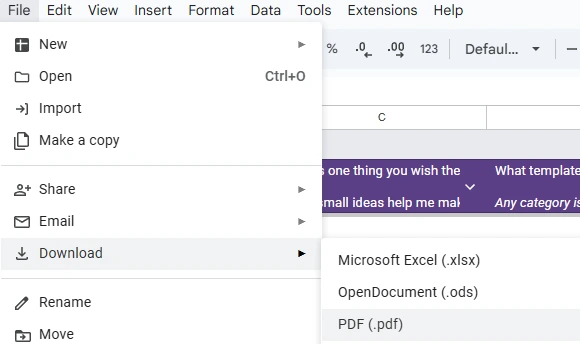
The template is formatted for clean printing — no messy breaks or overlapping cells. You can print directly from Excel or Google Sheets, or go to File → Download → PDF to send it digitally.
This is perfect for freelancers who want to send a simple quote, or small retailers who need a price list they can hand out or display.
Why This Template Stands Out
There are many Excel price list templates online, but this one is built for both clarity and flexibility. Every design choice was made to balance simplicity with professional function.
1. Designed for Real Use Cases
The layout mirrors what actual businesses need daily — not just sample data. You can easily adapt it for:
- Product-based businesses (retail, e-commerce, wholesalers)
- Service-based professionals (consultants, contractors, freelancers)
- Small offices or agencies that manage multiple quotes or estimates
2. Professional Formatting
The alternating row colors, consistent alignment, and pre-set print layout make it look great even without editing styles. For a stronger brand feel, simply change the header color or add your logo in the top-left corner.
3. Separate Tax Configuration
Most templates make you rewrite tax formulas every time you change rates. This one keeps things simple — just edit one number on the Tax Rate sheet, and everything else updates instantly.
4. Fully Compatible Across Platforms
It works seamlessly in both Excel and Google Sheets. Whether you prefer desktop Excel or online sharing through Google Drive, the formulas stay intact.
5. Customizable for Your Business Type
You can easily expand it by adding columns for “Category,” “SKU,” or “Supplier.” Some businesses even add a “Notes” column for quick reminders like “Seasonal item” or “Discontinued soon.”
Get Your Free Price List Spreadsheet
- Free Template
- Fully Editable
- Instant Access
- Organize your information
How to Access Your Copy
- Enter your email for instant access
- Open the link we send you
- Start using the spreadsheet right away
With just a few edits, you’ll have a price list that reflects your brand and keeps your pricing transparent. It’s a simple tool, but one that can save you hours of recalculations and keep your business communication polished.