
Keeping accurate rent records is one of the most important parts of managing a rental property. Whether you are a landlord, property manager, or tenant, having a clear and consistent rental ledger helps prevent disputes, track balances, and understand payment history at a glance. This rental ledger template for Google Sheets is designed to do exactly that, while also working seamlessly in Google Sheets.
This template is built as a practical tracking tool, not just a static table. It automatically calculates totals, balances due, payment status, and late days based on the data you enter. Instead of manually checking each row, you can open the dashboard and instantly see how much rent has been charged, how much has been paid, and which tenants still owe money.
Unlike overly complex accounting software, this rental ledger keeps everything in one place and stays easy to use. You enter rent charges, payments, and fees, and the spreadsheet does the rest. It works well for single-unit landlords, multi-property owners, and even tenants who want their own payment records.
This template can be used directly in Google Sheets, making it flexible for different workflows and preferences.
Key Features and Sections
This rental ledger template is organized into four main sheets, each with a clear role. Together, they create a complete rent tracking system that stays easy to maintain over time.
Rental Ledger Sheet
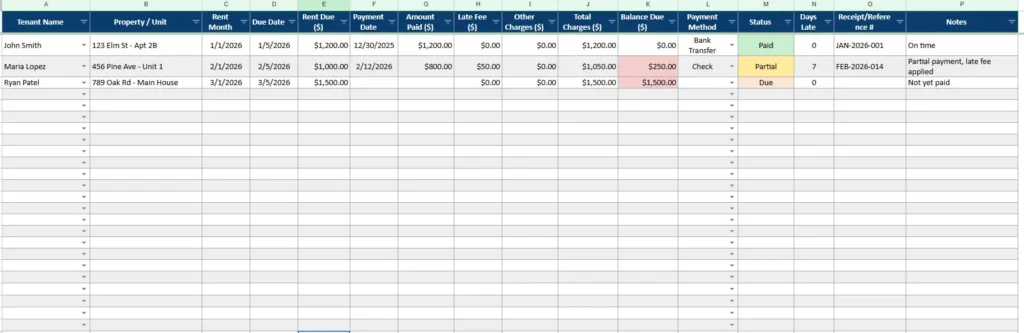
The Ledger sheet is where all rent activity is recorded. Each row represents one rent period for one tenant or unit, usually monthly. This structure makes it easy to see payment history in chronological order.
Key columns include tenant name, property or unit, rent month, due date, rent due, payment date, amount paid, late fees, and other charges. The template automatically calculates total charges and balance due for each row, so you always know how much is still owed.
The status column updates automatically based on the balance and due date, showing values such as Paid, Partial, or Due. Days late are also calculated automatically using today’s date, which means overdue information updates as soon as the sheet is opened.
This setup is especially helpful for tracking partial payments, late fees, and unpaid rent without needing to manually calculate anything.
Rental Ledger Dashboard
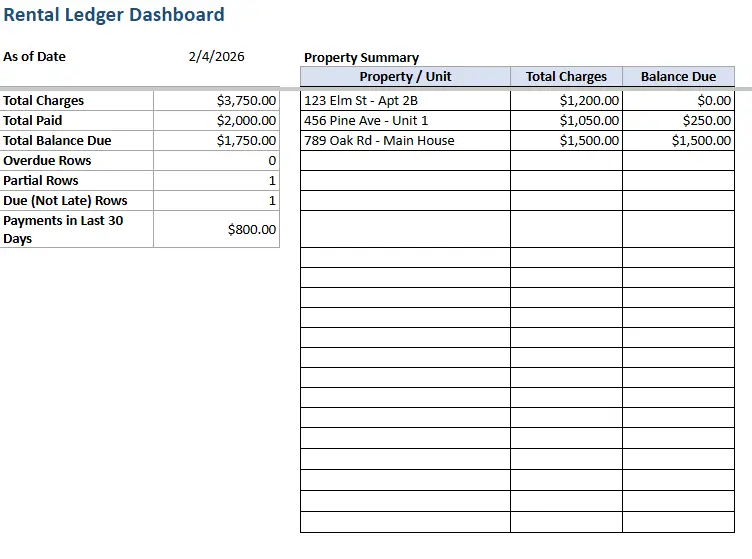
The Dashboard sheet provides a high-level summary of all rental activity. Instead of scanning dozens of ledger rows, you can see totals and key metrics in one place.
The dashboard shows total charges, total paid, and total balance due across all properties. It also counts overdue rows, partial payments, and payments that are due but not yet late. A rolling total of payments received in the last 30 days helps you quickly understand recent cash flow.
One of the most useful sections is the property summary table. This breaks down total charges and balances due by property or unit, making it easy to spot which locations are performing well and which need attention.
This sheet is ideal for landlords who manage multiple units and want a quick snapshot without digging into the raw data.
Dropdown Lists Sheet
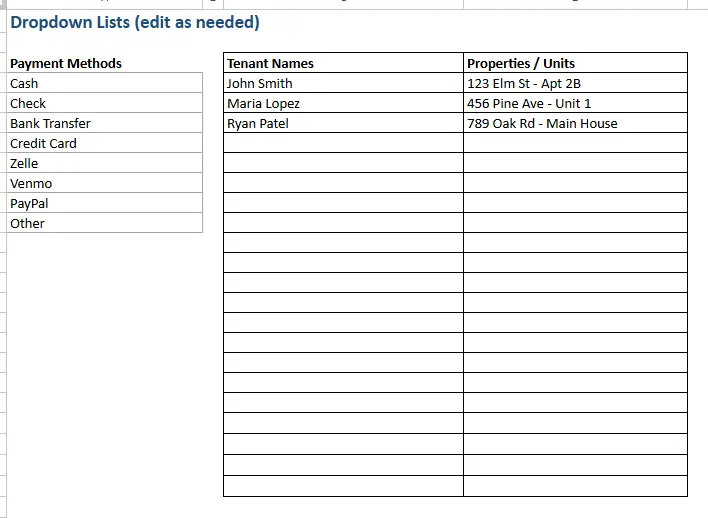
The Dropdown Lists sheet keeps your data clean and consistent. Instead of typing tenant names, properties, or payment methods manually each time, you select them from predefined lists.
Payment methods such as cash, check, bank transfer, credit card, and digital payments can be customized to match how you collect rent. Tenant names and property units are also stored here, making it easy to add new tenants or update property details without breaking formulas.
Because the ledger uses dropdowns connected to this sheet, you avoid spelling mistakes, mismatched names, and messy data that can cause reporting errors later.
How to Use Sheet
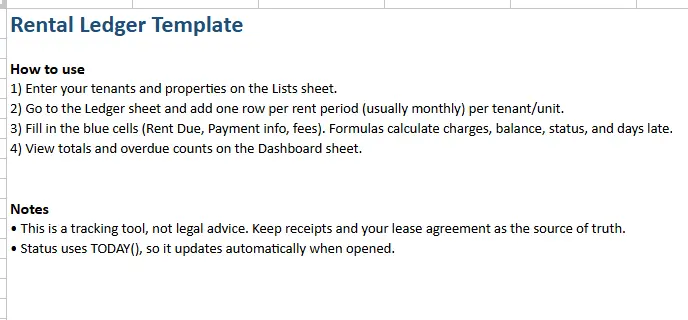
The How to Use sheet provides simple instructions built directly into the template. It explains how to enter tenants and properties, how to add new ledger rows, and which cells are meant for user input.
This sheet is especially helpful for first-time users or anyone sharing the file with a partner, bookkeeper, or property manager. It reduces confusion and makes onboarding faster.
How to Use the Template
Using this rental ledger template is straightforward, even if you are not an advanced spreadsheet user.
Begin with the Dropdown Lists sheet. Enter your tenant names and property or unit names here. If you manage multiple units at the same address, you can list each unit separately to keep records clear. Adjust payment methods to match how rent is collected.
Next, move to the Ledger sheet. For each rent period, add one row per tenant or unit. Enter the rent month, due date, rent amount, and any payment details. If a tenant pays late or partially, record the payment amount and any applicable late fees. The spreadsheet will calculate total charges, balance due, payment status, and days late automatically.
As payments come in, you can update the payment date and amount paid without changing the original rent due. This keeps a clean historical record of what was owed versus what was actually paid.
Finally, check the Dashboard sheet. This is where you can quickly review totals, see overdue balances, and understand how each property is performing. Because the dashboard pulls directly from the ledger, it updates automatically as soon as data changes.
This workflow works well on a monthly basis and scales easily as you add more tenants or properties.
Why Choose This Template
This rental ledger template is designed for real-world use, not just demonstration. It balances automation with simplicity, so you get useful calculations without unnecessary complexity.
For landlords, it provides a clear audit trail of rent charges and payments. This can be helpful for resolving disputes, preparing reports, or sharing records with accountants. The property summary makes it easy to see where outstanding balances exist without digging through rows of data.
For property managers, the template offers a lightweight alternative to expensive software. It works well for smaller portfolios and can be customized as your needs grow.
For tenants, a rental ledger can serve as personal proof of payment history. Keeping your own copy helps verify on-time payments and track balances, especially when dealing with partial payments or late fees.
Most importantly, the template is transparent. All formulas are visible, all calculations are traceable, and nothing is hidden behind complicated systems. That makes it easier to trust and easier to adapt.
Get Your Free Rental Ledger Spreadsheet
- Free Template
- Fully Editable
- Instant Access
- Organize your information
How to Access Your Copy
- Enter your email for instant access
- Open the link we send you
- Start using the spreadsheet right away





