If you resell products online — whether it’s thrifted fashion, electronics, or collectibles — keeping your inventory organized can make or break your business. Between tracking purchase costs, fees, and shipping, things get messy fast. That’s why we built this Reseller Inventory Spreadsheet for Google Sheets — a simple yet powerful tool designed to help online sellers manage listings, monitor profits, and stay on top of their business without expensive software.
This free template is ideal for anyone who sells on platforms like eBay, Poshmark, Depop, Mercari, or Facebook Marketplace. It helps you track what you bought, where it came from, how much it cost, and what you actually earned after fees and shipping. It’s easy to customize, mobile-friendly, and fully compatible with Google Sheets.
A Complete Overview of the Reseller Template
At its core, the Reseller Inventory Spreadsheet acts as your digital control center for everything you sell. Instead of juggling notes, receipts, and scattered spreadsheets, everything is structured neatly in one place.
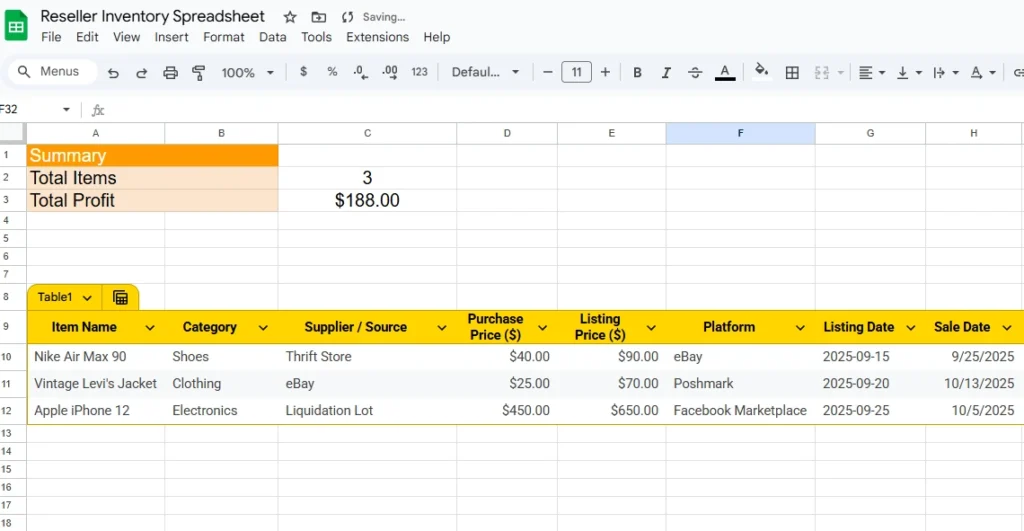
The spreadsheet includes two main parts:
- Reseller Inventory Sheet – where you record each item’s details and transactions.
- Summary Dashboard – an overview that automatically updates with total items, sales, and profits.
Each section is built for clarity. Whether you’re a part-time reseller flipping sneakers or a full-time small business owner running multiple accounts, this spreadsheet helps you see the big picture and make smarter decisions.
Imagine opening your sheet and instantly seeing how many items you’ve sold this month, which platforms are performing best, and how much profit you’ve made after fees. That’s exactly what this tool does.
Key Features That Make It Stand Out
Organized Item Tracking
Every item you source can be logged in detail. The Reseller sheet includes columns for:
- Item Name
- Category
- Supplier or Source
- Purchase Price
- Listing Price
- Platform
- Listing and Sale Dates
- Selling Price
- Fees and Shipping Costs
- Profit (auto-calculated)
- Status (Listed, Sold, or Unlisted)
- Notes
This structure ensures you never lose track of what’s selling, where it came from, or how much it actually earns you.
Built-In Profit Formula
The spreadsheet includes a ready-to-use profit formula so you don’t have to calculate manually. For each sale, it automatically subtracts your purchase cost, fees, and shipping from the selling price:
=IF(G2="", "", J2 - (D2 + K2 + L2))That means your profit column updates itself the moment you enter a sale price — saving time and ensuring consistency.
Real-Time Summary Dashboard
The Summary sheet pulls key numbers automatically. It shows:
- Total number of items in your inventory
- How many are listed and how many are sold
- Total profit earned
- Average profit per item
This quick overview helps you spot trends and measure performance without sorting through hundreds of rows.
Ready for Multi-Platform Sellers
Many resellers list items across multiple platforms. The Platform column allows you to filter by where the item is sold — eBay, Poshmark, Mercari, Depop, or any other site. This helps you see which marketplaces are most profitable and worth your time.
Easy to Customize
You can easily modify the spreadsheet to fit your specific business. Add more columns for SKU numbers, storage bins, or condition notes. You can also change the dropdown values in the Status column or adjust formulas for new fees or platforms. It’s flexible enough to grow with your reselling operation.
How to Use the Spreadsheet Step-by-Step
- Get the Template:
Click the download or “Make a Copy” link to open it in your Google Drive. You’ll have your own editable version instantly. - Enter Your Items:
On the “Reseller” tab, add each product you purchase. Include all key details — name, source, and how much you paid. - List Your Products:
Once you list an item on your chosen marketplace, fill in the “Platform” and “Listing Date” columns. Update the “Status” to Listed. - Record Sales:
When the item sells, add the “Sale Date,” “Selling Price,” “Fees,” and “Shipping Cost.” The profit column will automatically calculate your earnings. - Monitor Your Dashboard:
Open the “Summary” tab anytime to see how your reselling business is performing overall. The sheet automatically updates based on your entries. - Refine and Review:
Over time, you can filter your items by category, platform, or profit margin to see what’s working best.
For example, if you notice your profit margins are higher on electronics than on clothing, you can focus on sourcing more tech items. The spreadsheet gives you real, actionable insights without needing complicated accounting tools.
Why Resellers Love This Template
This spreadsheet was built for real sellers who need clarity, not complexity. Here’s why it stands out from other options:
- Completely Free: No subscription fees or locked features.
- Google Sheets Based: Access it anywhere — desktop, tablet, or phone.
- Beginner-Friendly: Clear labels and formulas so anyone can start using it right away.
- Data-Driven Decisions: Quickly see which platforms and products generate the most profit.
- Time-Saving Automation: Formulas handle calculations automatically, reducing manual work and errors.
- Scalable Design: Works whether you’re tracking 10 items or 1,000.
It’s perfect for part-time sellers testing the waters, thrift flippers who love data, or full-time online store owners who want a clean and functional system without paying for complex inventory software.
How This Template Can Help You Grow
Think of this spreadsheet as a foundation for your reselling business. Once you start using it, you’ll develop better habits around pricing, record-keeping, and profit analysis. For example:
- You’ll know exactly how much you can afford to spend on sourcing trips.
- You’ll identify which categories consistently bring higher returns.
- You’ll track how long items take to sell and use that data to plan future listings.
Even small resellers who handle a few dozen items a month can benefit. Over time, these insights translate into higher profits and fewer mistakes.
Download Your Free Reseller Inventory Spreadsheet
- Free Template
- Fully Editable
- Instant Access
- Organize your information
How to Access Your Copy
- Enter your email for instant access
- Open the link we send you
- Start using the spreadsheet right away
You don’t need complicated software to stay organized — just a clear, structured spreadsheet built with resellers in mind. This free tool gives you control, clarity, and confidence in how you manage your business.
Final Thoughts
Running a reselling business means juggling a lot of moving parts — sourcing, photographing, listing, shipping, and tracking every dollar. The Reseller Inventory Spreadsheet from Sheetrix simplifies that entire process. With automatic profit tracking and an easy-to-read dashboard, you’ll spend less time organizing and more time selling.
If you’re serious about growing your reselling side hustle or online store, download the spreadsheet today and see how much easier it is to stay on top of your business.