
Understanding labor costs is one of the most important parts of running a profitable restaurant. Whether the operation is a small family restaurant, a café, a food truck, or a multi location brand, labor expenses can take up a large portion of revenue. This Restaurant Labor Cost Spreadsheet was created to help owners, supervisors, and managers track their weekly payroll costs with clarity and confidence. By entering employee hours into a simple layout, the spreadsheet calculates regular labor cost, overtime cost, and total labor cost for the entire week.
The template uses only two sheets. The first sheet is called Weekly Cost and contains the full calculator, including the labor overview at the top and the individual employee tables below it. The second sheet is called Staff Roles and powers the dropdown lists inside the calculator. This structure keeps the spreadsheet easy to understand, easy to edit, and easy to maintain even when your team changes.
Instead of using complicated software or manual worksheets, this spreadsheet gives restaurant operators a clean and organized tool they can use every week. It is designed for Google Sheets so teams can share it, update it, or review it from anywhere. By tracking labor consistently, owners can catch overtime, adjust scheduling patterns, prevent overspending, and improve their labor percentage over time.
Key Features and Sections
This template focuses on the essentials that restaurant operators truly need. It separates labor into three familiar categories: FOH, BOH, and management. Each category has its own table inside the Weekly Cost sheet, and all of the numbers automatically feed into the summary at the top. Below is a detailed look at each section.
Weekly Cost Sheet

The Weekly Cost sheet is the main dashboard of the template. At the very top is the Overall Summary table, which shows the total hours, overtime hours, labor cost, overtime cost, and combined total for FOH, BOH, and management. This summary updates instantly as you enter hours in the employee tables below.
The summary also calculates your gross payroll for the week. Because many restaurants monitor labor percentage closely, the sheet includes a field where you can enter your weekly sales. Once you do, the template calculates your labor cost percentage automatically. This becomes a valuable indicator that helps you understand whether you are within your target range.
Below the summary are three employee tables: FOH, BOH, and Management. Each one includes columns for name, role, hours, overtime hours, hourly rate, overtime rate, regular labor cost, overtime cost, and combined cost. The totals row at the bottom of each table rolls up into the summary.
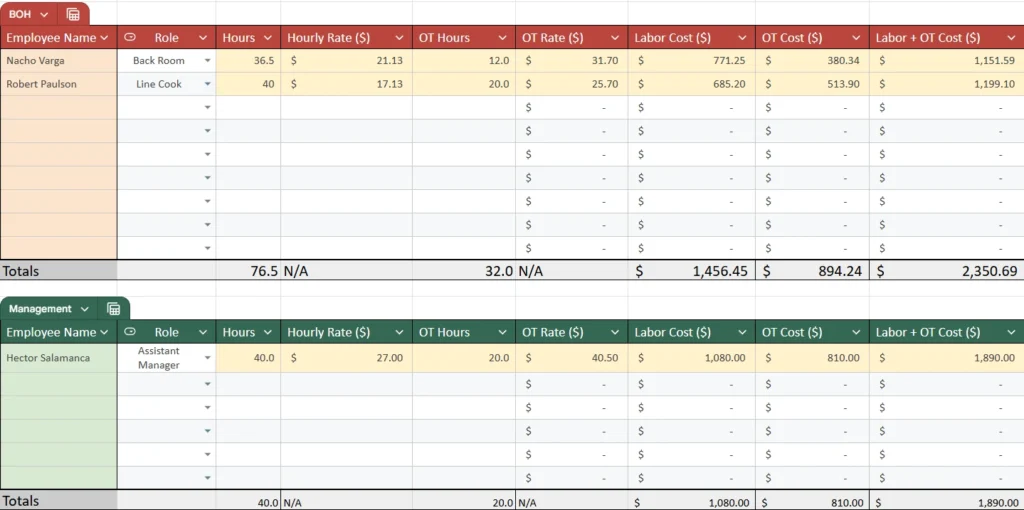
The FOH table is for guest facing staff such as servers, bussers, hosts, bartenders, or food runners. The BOH table is for kitchen and support staff such as line cooks, prep cooks, dishwashers, and back room employees. The Management table is for supervisors, assistant managers, and general managers.
These three categories match the way most restaurants actually organize their labor. Owners can easily compare how much of their weekly payroll belongs to FOH service labor, kitchen labor, and leadership labor. This helps with scheduling decisions, cost control, and long term planning.
Staff Roles Sheet
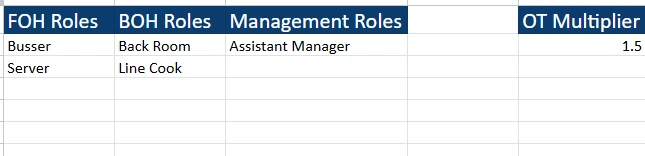
The Staff Roles sheet keeps the template simple and prevents mistakes. It contains three columns: FOH Roles, BOH Roles, and Management Roles. Any role you list here appears in the dropdown menu inside the Weekly Cost sheet. This allows you to maintain clean and consistent job titles without retyping them each time.
The Staff Roles sheet also contains the overtime multiplier. Most restaurants use a 1.5 multiplier for overtime pay, but some areas use a different value. If you change the multiplier here, all overtime calculations inside the Weekly Cost sheet update automatically.
This sheet is especially useful in restaurants with seasonal hiring, rotating kitchen staff, or multiple positions with similar names. You can easily add new roles when needed and remove roles that are no longer used. This keeps the spreadsheet up to date at all times.
How to Use the Template
The template is built so restaurant operators can update it quickly each week. Even if you are new to spreadsheets, the layout is clear enough to follow without difficulty. Below is a step by step guide to using the Weekly Cost sheet correctly.
Start with the FOH table. Enter the employee names for the week in the first column. Use the role dropdown to choose the correct role. Next, enter the total hours the employee worked. If they received overtime, add the overtime hours as well. Enter their hourly rate, and the sheet will calculate the overtime rate automatically using the multiplier from the Staff Roles sheet.
The sheet then calculates regular labor cost and overtime cost. The combined labor cost column gives you the total amount you spent on that employee for the week. The totals row at the bottom adds all FOH hours and costs together.
Repeat this process for the BOH table. Since kitchen staff often have different shift structures than FOH staff, this table helps operators understand how much of their labor spending is coming from the kitchen. BOH overtime can sometimes grow quickly without the owner noticing, so this table helps identify trends.
Next, update the Management table. Some restaurants have one manager, while others have several. You can enter hourly rates or an equivalent hourly rate if a manager is salaried. Enter hours the same way as the other tables. The totals update automatically.
Once all employee data is entered, scroll back to the top of the sheet and review the Overall Summary. This gives you a clear view of FOH, BOH, and Management labor totals for the week. It also displays gross payroll.
If you want to calculate your labor cost percentage, enter your weekly sales into the field provided. The sheet will calculate the percentage for you. For example, if your labor cost for the week is five thousand eight hundred dollars and your sales are eighteen thousand dollars, the sheet will show that your labor is about thirty two percent.
Restaurant owners can use this information to see whether they need to adjust upcoming schedules. If FOH labor is too high on slow days, you can reduce overlap. If BOH overtime is increasing, you can adjust prep timing or bring in additional part time support. If management hours are increasing more than expected, you can evaluate shift coverage or training needs.
Why Choose This Template
This restaurant labor cost spreadsheet is built for clarity and real world use. Many templates online feel too generic or too complicated. This one stays focused on what restaurant operators actually need. It separates labor into FOH, BOH, and Management so the numbers make sense at a glance.
By keeping everything in a single Weekly Cost sheet, the template remains easy to use. The Staff Roles sheet adds flexibility so your team can grow or change without disrupting your workflow. The automatic calculations save time every week and reduce the risk of errors.
This template is helpful for restaurant owners, managers, chefs, shift leaders, food truck operators, café owners, and individuals who need a dependable weekly labor tracker. It provides a clear picture of labor spending and helps restaurants stay within healthy labor percentages. Whether you run a small operation or a busy full service restaurant, this tool makes weekly payroll analysis easier and more accurate.
Get Your Free Restaurant Labor Cost Spreadsheet
- Free Template
- Fully Editable
- Instant Access
- Organize your information
How to Access Your Copy
- Enter your email for instant access
- Open the link we send you
- Start using the spreadsheet right away





