
Managing a successful salon requires more than just styling skills and a loyal client base. It demands careful attention to your finances, particularly your monthly expenses. Whether you run a small boutique salon or manage a larger operation with multiple stylists, keeping track of where your money goes is essential for profitability and growth. That’s where a well-designed salon expenses spreadsheet becomes invaluable.
Our Salon Expenses Spreadsheet Template for Google Sheets provides salon owners with a comprehensive system to monitor every dollar spent on running their business. From payroll costs to product supplies, rent payments to marketing campaigns, this template helps you organize all your expense data in one accessible location. Unlike generic expense trackers, this spreadsheet is specifically designed with the unique needs of salon businesses in mind, featuring categories and line items that reflect real-world salon operations.
Overview of the Template
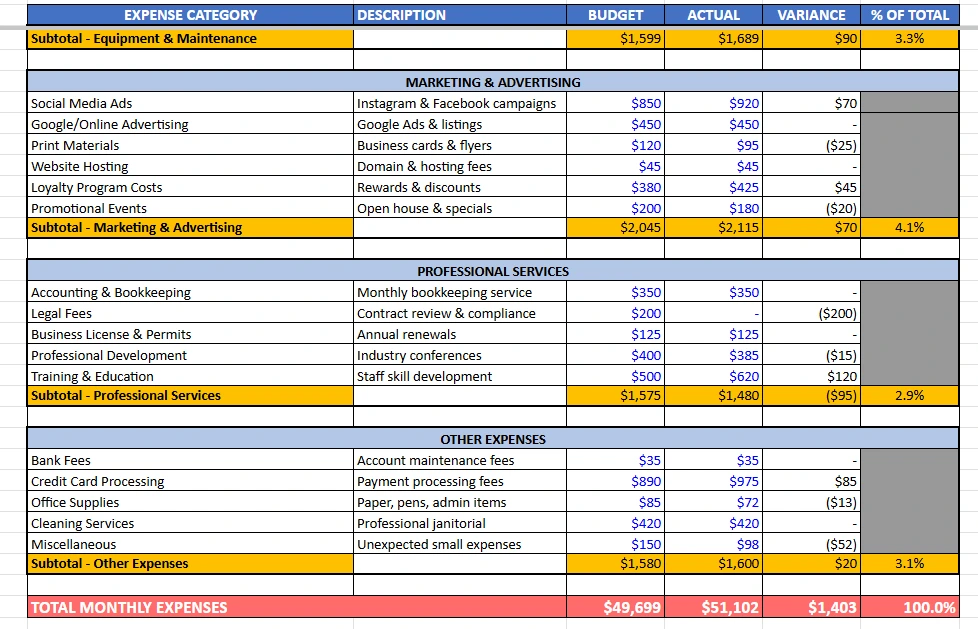
This salon expenses spreadsheet template comes ready to use with realistic sample data from a fictional salon called “Luxe Hair Studio.” The template tracks approximately $51,000 in monthly expenses across seven major categories, giving you a clear picture of what a complete expense tracking system looks like in action. You can easily replace the sample data with your own numbers, and all the formulas will automatically recalculate to reflect your actual business costs.
The template is built entirely in Google Sheets, making it accessible from any device with internet access. You can update your expenses from your phone while at a supplier, review your budget from your tablet at home, or analyze your spending patterns on your computer in the office. The cloud-based nature of Google Sheets also means your data is automatically saved and backed up, eliminating the risk of losing important financial information.
Inside the spreadsheet, you’ll find three professionally designed worksheets. The main “Monthly Expenses” sheet contains all your detailed expense tracking with budget versus actual comparisons. The “Instructions” sheet provides clear guidance on how to use the template effectively, including industry benchmarks to help you evaluate your spending. The “Summary Dashboard” sheet offers a high-level overview with visual representations of your expense distribution, making it easy to see which categories consume the largest portions of your budget.
Key Features and Sections
The template organizes salon expenses into seven comprehensive categories that cover virtually every cost a salon incurs. Each category includes relevant subcategories with descriptions, making it easy to classify your expenses correctly.
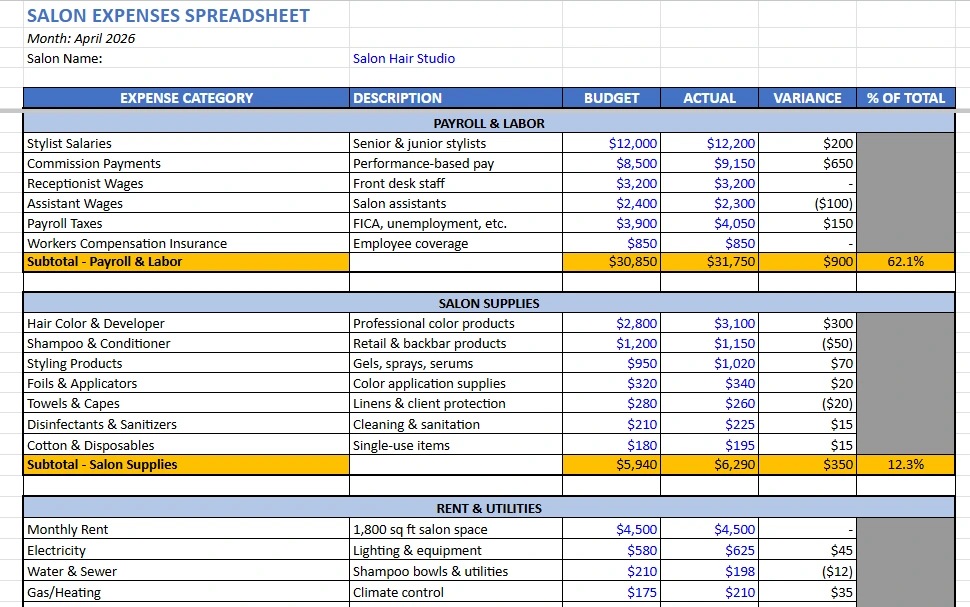
The Payroll and Labor section tracks all employee-related costs, including stylist salaries, commission payments for performance-based compensation, receptionist and assistant wages, payroll taxes, and workers compensation insurance. This category typically represents the largest expense for most salons, often accounting for 45 to 55 percent of total costs. In the sample data, Luxe Hair Studio budgets $30,850 for payroll but actually spends $31,750, showing a common scenario where commission payments or overtime can push labor costs above projections.
The Salon Supplies category monitors all the products and materials you use to serve clients. This includes hair color and developer, shampoo and conditioner for both retail and backbar use, styling products like gels and serums, foils and applicators for color services, towels and capes, disinfectants and sanitizers, and cotton and disposable items. Smart salon owners know that tracking supply costs carefully helps identify waste and opportunities to negotiate better pricing with vendors. The template shows supply costs at $6,290 actual versus $5,940 budgeted, highlighting how product usage can exceed estimates when client volume increases or stylists are generous with product application.
The Rent and Utilities section captures all facility-related expenses. This includes monthly rent payments, electricity for lighting and equipment, water and sewer charges from shampoo bowl usage, gas or heating costs for climate control, internet and phone services for business connectivity, and property insurance for liability and asset protection. These costs tend to be relatively stable month to month, making them easier to budget accurately.
Equipment and Maintenance expenses cover styling chair leases or purchases, dryer and equipment maintenance, equipment repairs for unexpected breakdowns, new tool purchases like shears and flat irons, and software subscriptions for booking systems and point-of-sale platforms. In the sample data, equipment repairs came in $90 over budget at $240, demonstrating how unexpected mechanical issues can impact your monthly expenses.
Marketing and Advertising costs include social media ads on platforms like Instagram and Facebook, Google and online advertising for local search visibility, print materials such as business cards and flyers, website hosting and domain fees, loyalty program costs for rewards and discounts, and promotional events like open houses. The template shows marketing costs at $2,115, representing about 4 percent of total expenses, which falls within the recommended 3 to 6 percent range for service businesses.
Professional Services encompass accounting and bookkeeping, legal fees for contracts and compliance, business licenses and permits, professional development through industry conferences, and training and education for staff skill development. Notice in the sample data that legal fees show zero dollars in actual spending, while $200 was budgeted. This illustrates how some professional services are used only as needed rather than monthly.
Other Expenses capture miscellaneous costs like bank fees, credit card processing charges, office supplies, cleaning services, and unexpected small expenses. Credit card processing at $975 represents a significant portion of this category, reflecting the reality that many salons now process most payments electronically, incurring fees typically ranging from 2 to 3 percent of transaction values.
Monthly Expenses Sheet
The Monthly Expenses sheet is the heart of the template, where you input and track all your spending data. Each expense line includes columns for the expense name, a description field, your budgeted amount, the actual amount spent, the variance between budget and actual, and the percentage of total expenses that category represents.
The variance column uses a simple but effective formula that subtracts your budget from your actual spending. Positive numbers indicate you spent more than budgeted, while negative numbers show you came in under budget. For example, Assistant Wages shows a negative $100 variance, meaning the salon spent $100 less than expected, perhaps due to an assistant taking unpaid time off or reduced scheduling.
The percentage of total column provides valuable context by showing what portion of your overall expenses each category consumes. In the sample data, Payroll and Labor represents 62 percent of total expenses, immediately identifying it as the area deserving the most attention for cost management. This percentage updates automatically as you change your actual expense numbers, giving you real-time insights into your spending distribution.
Category subtotals appear in distinctive yellow highlighting with bold text, making it easy to scan the spreadsheet and quickly identify the totals for each expense group. The grand total at the bottom uses red highlighting to draw attention to your overall monthly expense figure. All monetary values display in standard currency format with dollar signs and comma separators for easy reading.
Instructions Sheet
The Instructions sheet removes all guesswork from using the template effectively. It explains the purpose of the spreadsheet, walks through step-by-step usage instructions, defines each expense category with examples, and provides practical tips for maintaining accurate expense records.
One particularly valuable section compares your expense percentages against industry benchmarks. For instance, it notes that payroll and labor should typically fall between 45 and 55 percent of revenue, not total expenses. This distinction is important because it helps you evaluate whether your spending levels align with successful salons nationwide. If your payroll percentage significantly exceeds these benchmarks, it might signal overstaffing, excessive commission rates, or insufficient revenue generation.
The instructions also remind users that the template includes sample data from Luxe Hair Studio specifically to demonstrate functionality. New users are encouraged to replace this sample data with their own numbers while using the existing structure as a guide for categorizing their unique expenses.
Summary Dashboard Sheet
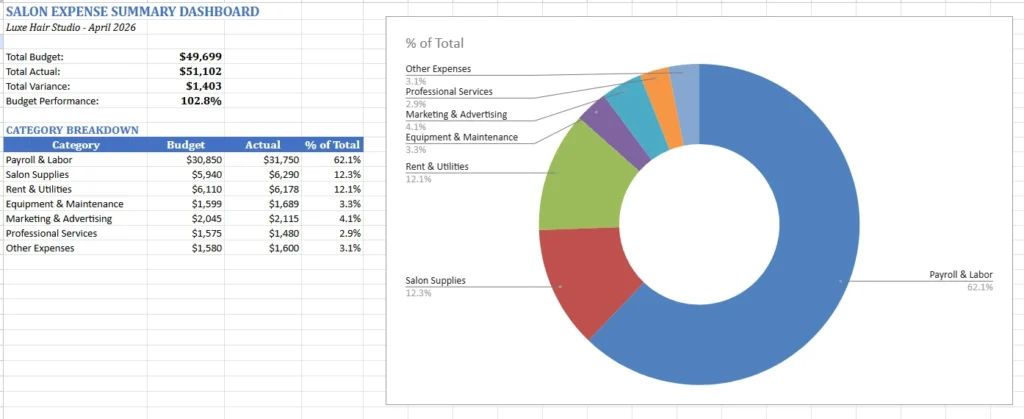
The Summary Dashboard sheet provides a quick visual snapshot of your salon’s financial health. At the top, you’ll see four key metrics pulled directly from the Monthly Expenses sheet through cell references. Total Budget shows your planned spending, Total Actual displays what you really spent, Total Variance indicates whether you’re over or under budget overall, and Budget Performance calculates what percentage of your budget you actually used.
In the sample data, Budget Performance shows 102.8 percent, meaning Luxe Hair Studio spent about 3 percent more than budgeted for the month. This type of insight helps you quickly assess whether you’re staying on track financially or need to investigate unexpected cost increases.
Below the summary metrics, a category breakdown table lists all seven expense categories with their actual spending amounts and percentages of the total. This table feeds into a pie chart visualization that graphically displays your expense distribution. The pie chart makes it immediately obvious that Payroll and Labor dominates expenses at 62 percent, followed by Salon Supplies and Rent and Utilities at roughly 12 percent each. Visual learners particularly appreciate this representation as it communicates complex financial data at a glance.
How to Use the Template
Getting started with the salon expenses spreadsheet is straightforward. First, download the template and open it in Google Sheets. You’ll see the sample data from Luxe Hair Studio already populated throughout the worksheets.
Begin by personalizing the template with your salon’s information. In cell B3 of the Monthly Expenses sheet, replace “Luxe Hair Studio” with your salon’s name. Update the month and year in cell A2 to reflect the period you’re tracking. These small customizations make the spreadsheet feel like your own financial tool rather than a generic template.
Next, focus on the Budget column, which appears in blue text throughout the expense categories. These blue numbers are meant to be edited with your planned spending amounts. Review each expense line and enter what you expect to spend in that category for the month. For example, if your monthly rent is $3,800, replace the sample $4,500 rent budget with your actual figure. If you don’t have a particular expense, simply enter zero or leave the cell blank.
As the month progresses and you incur expenses, record them in the Actual column. You might update this weekly or even daily depending on your preference for real-time financial tracking. Some salon owners batch their updates once per week, entering receipts and invoices accumulated over the previous seven days. Others prefer updating immediately after making purchases to ensure nothing gets forgotten.
The Variance and Percentage of Total columns require no manual input because they contain formulas that calculate automatically. As you enter actual expenses, you’ll see the variance update to show whether you’re over or under budget for each line item. The percentage calculations adjust dynamically to reflect your current spending patterns.
Pay special attention to the category subtotals highlighted in yellow. These provide interim checkpoints that help you evaluate spending at the category level before looking at your overall total. If you notice the Salon Supplies subtotal running significantly over budget, you can drill down into individual supply line items to identify the specific products driving the overspend.
The grand total at the bottom, highlighted in red, represents your complete monthly expense picture. This is the number you’ll want to compare against your monthly revenue to determine profitability. A profitable salon typically maintains total expenses at 60 to 75 percent of revenue, leaving 25 to 40 percent as net profit before taxes.
Don’t forget to review the Summary Dashboard sheet regularly. The pie chart visualization updates automatically as you enter expenses, providing an evolving picture of your spending distribution. If you notice any category growing disproportionately large, you can investigate whether that growth is justified by business expansion or represents wasteful spending that needs correction.
For best results, establish a consistent routine for updating your expenses. Many successful salon owners designate Friday afternoons or Monday mornings as their “finance time” to enter the previous week’s expenses while everything is still fresh in their memory. This regular habit prevents the accumulation of unrecorded expenses that can lead to inaccurate financial tracking.
Why Choose This Template
Salon owners juggle numerous responsibilities daily, from managing staff schedules to ensuring client satisfaction to maintaining equipment and facilities. Adding financial tracking to this list can feel overwhelming, especially if you’re not naturally inclined toward numbers and spreadsheets. This template eliminates that overwhelm by providing a ready-made structure designed specifically for salon expense tracking.
Unlike generic expense trackers that force you to create categories from scratch, this template comes pre-loaded with expense categories that match real salon operations. You won’t waste time wondering whether to classify hair color purchases under “supplies,” “inventory,” or “cost of goods sold” because the template already includes a logical categorization system used by successful salons nationwide.
The budget versus actual comparison feature provides accountability that’s often missing from simple expense lists. When you commit to a budget at the beginning of the month, you create a financial target that guides your spending decisions. Throughout the month, the variance calculations show whether you’re honoring those targets or drifting into overspending. This real-time feedback helps you course-correct before minor budget overruns become major financial problems.
The template’s visual dashboard transforms raw numbers into actionable insights. Rather than staring at rows of figures trying to mentally calculate percentages, you can glance at the pie chart and immediately understand your expense composition. This visual approach is particularly helpful when communicating financial information to business partners, investors, or even key staff members who need to understand the salon’s cost structure.
Because the template lives in Google Sheets, collaboration becomes effortless. You can grant view or edit access to your accountant, allowing them to review your expense tracking without requiring you to export and email files back and forth. If you have a salon manager who handles certain purchasing decisions, you can give them access to update specific expense categories while restricting their ability to see sensitive payroll information.
The automatic calculations eliminate mathematical errors that plague manual expense tracking. When you’re tired at the end of a long day of appointments, it’s easy to misplace a decimal point or add a column incorrectly. The template’s formulas ensure your totals, percentages, and variances are always accurate, letting you trust the numbers you’re seeing.
Perhaps most importantly, this template grows with your business. As your salon expands and adds new expense categories, you can easily insert additional rows following the existing format. The formulas are built to accommodate changes, automatically including new line items in category subtotals and the grand total calculation.
For salon owners considering this template, it’s worth noting that effective expense tracking often reveals surprising insights. You might discover you’re spending three times more on certain styling products than necessary because stylists are using excessive amounts. You might find that a specific supply vendor has gradually increased prices to the point where switching vendors would save hundreds of dollars monthly. You might realize your marketing spending is too heavily weighted toward one channel that’s not delivering results. These insights only become visible when you track expenses systematically and review them regularly.
Download Your Free Salon Expenses Spreadsheet
- Free Template
- Fully Editable
- Instant Access
- Organize your information
How to Access Your Copy
- Enter your email for instant access
- Open the link we send you
- Start using the spreadsheet right away





