
Managing salon inventory is one of the most time-consuming tasks owners and stylists face. Between tracking hair color, developers, shampoo backbar items, retail products, disposables, and salon tools, it’s easy for supplies to run low without warning. That’s exactly why this Salon Inventory Spreadsheet was created—so you can stay organized, maintain consistent stock levels, and avoid last-minute product shortages.
This template replaces restaurant-specific terminology with salon-friendly language, ensuring the fields match the way stylists and salon managers actually talk about their supplies. You’ll find updated product categories, relevant unit types (like tubes, bottles, and ounces), and storage locations that reflect a real salon layout. The entire spreadsheet is designed to be intuitive for everyday use, even if you don’t consider yourself a spreadsheet expert.
Whether you run a hair salon, spa, barbershop, or multi-service studio, this template helps you clearly see what you have, what you’re running low on, and how much your inventory is worth. With automated totals, clean dropdowns, and status indicators, you can manage your backbar and retail stock with confidence.
Key Features and Sections
This spreadsheet includes multiple sheets that work together to keep your inventory updated and accurate. Each sheet has its own purpose and plays a role in powering dropdown menus, status labels, and automated calculations.
Inventory Sheet
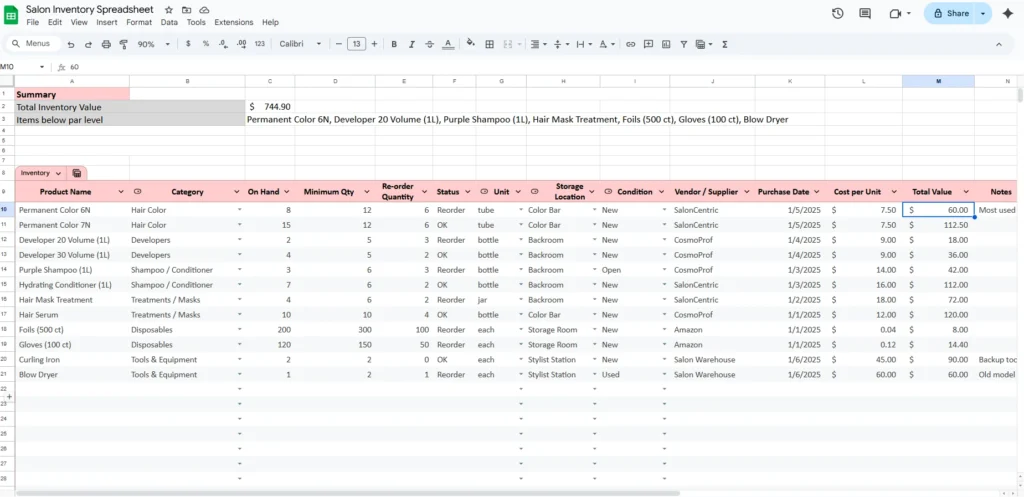
The Inventory sheet is the center of the entire template. This is where you track every product you have on hand—from hair color tubes to salon tools. Each column is tailored to how salons operate:
- Product Name: The exact item, such as “Permanent Color 6N” or “Foils (500 ct).”
- Category: Organized into salon-specific groups like Hair Color, Developers, Shampoo/Conditioner, Treatments/Masks, Retail Products, Tools & Equipment, or Disposables.
- On Hand: The current quantity available. This number updates as you use or purchase items.
- Minimum Qty: Your reorder point—the lowest quantity you want before restocking.
- Reorder Quantity: The typical amount you purchase when restocking.
- Status: Automatically shows whether an item is “OK” or “Reorder.”
- Unit: Formats like tube, bottle, ml, oz, jar, or each.
- Storage Location: Where the product is stored (Color Bar, Backroom, Retail Shelf, Stylist Station, etc.).
- Condition: New, Open, Used, or Expiring Soon.
- Vendor/Supplier: Where you purchase the product (SalonCentric, CosmoProf, Amazon, etc.).
- Purchase Date: When the product was bought.
- Cost per Unit: The price per bottle, tube, or item.
- Total Value: Automatically calculated based on cost and quantity.
This structure gives you a complete picture of your inventory at a glance. The spreadsheet calculates total inventory value for you and highlights items that need to be reordered so you never run out unexpectedly.
Dropdowns Sheet
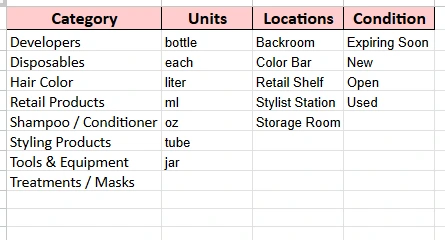
The Dropdowns sheet defines the categories, units, locations, and condition options that feed into your dropdown menus. This ensures consistency—your entries stay clean, organized, and error-free.
The template includes:
- Categories: Hair Color, Developers, Disposables, Retail Products, Styling Products, Tools & Equipment, Shampoo/Conditioner, Treatments/Masks
- Units: bottle, each, liter, ml, oz, tube, jar
- Locations: Backroom, Color Bar, Retail Shelf, Stylist Station, Storage Room
- Condition: Expiring Soon, New, Open, Used
You can add, remove, or rename options at any time. The Inventory sheet automatically updates to include your changes.
Summary Section
At the top of the workbook, the Summary section gives you quick, high-level insights:
- Total Inventory Value: The combined value of everything currently in stock.
- Items Below Minimum Level: A list of products that require restocking.
This acts as your real-time dashboard. Instead of scanning through rows manually, the summary highlights what needs attention. Salon owners who manage multiple stylists will especially appreciate how quickly this view reveals low-stock items across the entire salon.
How to Use the Template
This template is designed for ease of use, whether you’re the salon owner, a manager, or a lead stylist in charge of inventory.
Step 1: Enter Your Products
Start by filling the Inventory sheet with the products you currently use:
- Hair color tubes
- Developers
- Shampoos and conditioners
- Treatments and masks
- Styling products
- Retail merchandise
- Foils, gloves, and other disposables
- Tools and equipment like blow dryers or curling irons
Include as much detail as you can. Adding vendors, cost per unit, and purchase dates draws a clear picture of your expenses and product turnover.
Step 2: Set Your Minimum Quantities
Your Minimum Qty is the point at which you want to reorder a product. For example:
- If you typically go through 12 tubes of 6N per month, you may set your minimum at 8.
- If you only use one liter of 20-volume developer at a time, a minimum of 2 makes sense.
- A salon may carry three boxes of gloves, so their minimum might be 1.
Setting realistic reorder points prevents emergencies and last-minute trips to distributors.
Step 3: Update Quantities as You Go
You can update quantities daily, weekly, or whenever new shipments arrive. The Status column will instantly show you which items need attention.
For example:
- If you drop from 15 tubes to 8, and your minimum is 10, the status changes to Reorder.
- If you receive an order of 6 bottles of purple shampoo, simply add them to your On Hand count.
The spreadsheet does all the math for you.
Step 4: Track Total Value and Purchase Costs
Every time you enter a cost per unit, the spreadsheet calculates total value. This is especially useful for:
- Salon owners preparing tax reports
- Commission stylists managing their own color
- Independent booth renters who need to track expenses
- Managers who want to understand product usage trends
By reviewing inventory value regularly, you can better plan budgets, manage backbar expenses, and control waste.
Step 5: Customize the Dropdowns as Needed
If you add new product types or create a new storage area, simply update the Dropdowns sheet. The changes automatically apply to the entire Inventory sheet.
Why Choose This Template
This Salon Inventory Spreadsheet stands out because it’s built specifically for the workflows and terminology of real salons. It isn’t a repurposed warehouse template or a generic “small business inventory” file. It’s designed around the daily reality of stylists, colorists, assistants, and salon owners.
Here are a few reasons professionals prefer this template:
- It’s intuitive and fast: You don’t need spreadsheet experience to use it effectively.
- It uses salon language: Items like tubes, bottles, foils, and backbar supplies are already built in.
- It prevents stockouts: The status system instantly flags products that need restocking.
- It saves money: Tracking costs and quantities helps reduce waste and over-ordering.
- It fits any salon size: From solo stylists to multi-chair salons, the structure scales easily.
- It keeps the team organized: Everyone knows where products belong and what needs to be replaced.
Whether you’re managing color, retail inventory, or salon supplies, this template provides clarity and control.
Get Your Free Salon Inventory Spreadsheet
- Free Template
- Fully Editable
- Instant Access
- Organize your information
How to Access Your Copy
- Enter your email for instant access
- Open the link we send you
- Start using the spreadsheet right away
Conclusion
Keeping track of salon inventory doesn’t have to be overwhelming. With this spreadsheet, you can maintain accurate stock levels, avoid expensive rush orders, and understand the true value of the products you keep on hand. The template is flexible enough for any salon and detailed enough for owners who want full insight into their operations.
If you’re ready to take control of your salon’s inventory, streamline your processes, and keep your shelves stocked without stress, download the template and start using it today. It’s a simple tool that can make a meaningful difference in how your salon operates.





