
Balancing classes, part-time work, and a social life can make managing money feel overwhelming for students. Between tuition, textbooks, rent, and groceries, it’s easy to lose track of where your money goes each month. That’s why this Student Budget Template for Google Sheets was created — a simple, one-page spreadsheet that helps students plan, track, and control their finances with ease.
This budget template is perfect for high school and college students who want a clear picture of their spending habits without the need for complicated finance tools or paid apps. It gives you an organized layout to record income, expenses, and savings all in one place, helping you see exactly where your money is going and how much you can save.
A Simple Overview of the Student Budget Template
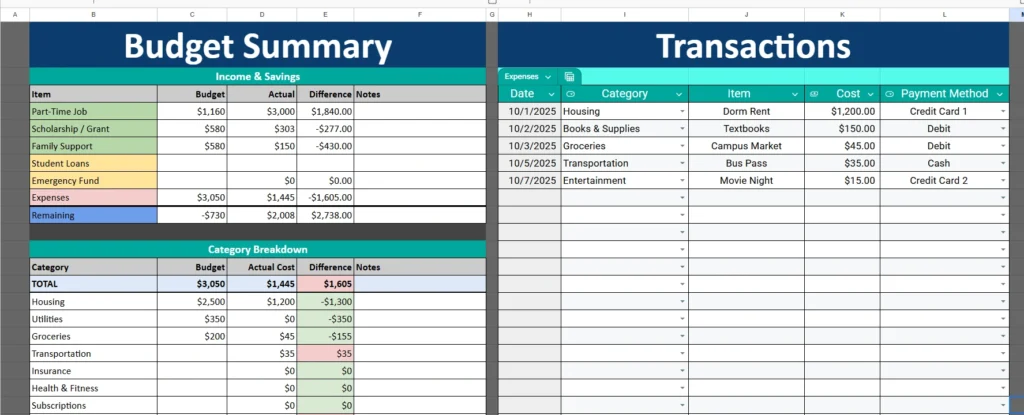
This one-page Google Sheets student budget is divided into two main sections: a Student Budget Summary and a Student Expenses tracker. The setup is designed to give you both a high-level financial overview and a detailed look at where your money is spent, all on the same screen.
You’ll find that every area of this template is designed to be beginner-friendly. Students who are new to budgeting can start by filling in a few numbers, while more detail-oriented users can dive deeper and customize each section for a specific semester or month.
The left side of the sheet focuses on your income, budget goals, and spending summary, while the right side lists individual transactions — from rent payments to coffee runs — making it easy to connect your daily spending to your monthly totals.
Key Features and Sections of the Template
This student budget spreadsheet includes several connected areas that automatically calculate totals and differences to help you make better financial decisions.
Student Budget Summary
The Budget Summary is the main financial dashboard. It helps you compare your planned versus actual income and expenses, showing whether you’re staying within budget. You can add your income sources, savings goals, and monthly expenses. The sheet automatically updates totals and differences so you can quickly see how your budget is performing.
For example, a student might set an income goal of $1,200 per month from a part-time job and an additional $400 from a scholarship. Once you enter your actual earnings, the sheet calculates how close you are to your goals and shows if you need to adjust spending for the rest of the month.
Category Breakdown
The Category Breakdown below your summary gives a deeper look into where your money goes. It includes realistic student categories such as Housing, Books & Supplies, Groceries, Transportation, Subscriptions, Dining Out, and Entertainment.
Each category shows your budget, actual cost, and the difference — so if you planned $300 for groceries but spent $250, you’ll see a $50 surplus. On the other hand, if you went over on dining out, the template highlights that overspending automatically, making it easy to spot habits that need adjustment.
Student Expenses Tracker
On the right side of the sheet is the Expenses Tracker, where you record every transaction. You can enter the date, category, item, cost, and payment method. As you add items, totals in the summary and category breakdown update automatically.
This part of the template acts like your digital spending journal. You can see exactly how much you’ve spent and where, which helps build awareness of daily habits. For instance, a student might notice they’re spending $100 a month on coffee or rideshares — easy areas to cut back when saving for larger goals.
How to Use the Template Effectively
The beauty of this Student Budget Template lies in its simplicity. Whether you’re living in a dorm, sharing an apartment, or commuting from home, you can adapt it to your financial situation in just a few steps.
Start by entering your expected monthly income in the Student Budget Summary — things like part-time work, scholarships, or allowances. Then list your budgeted expenses for essentials such as rent, groceries, books, and transportation. As the month progresses, add your actual spending in the Student Expenses section.
Each time you update a transaction, the totals on the left automatically refresh to show how much money you’ve spent, how much remains, and how your spending compares to your budgeted plan.
You can also customize the sheet to match your semester schedule. For example, label the top section as “September Budget” or “Fall Semester,” then duplicate the sheet for each new month or term. Over time, you’ll build a record of how your spending changes throughout the year — a useful tool when planning ahead or setting savings goals.
If you want to visualize your spending further, you can insert a simple pie chart using the Category Breakdown data. This gives you a quick visual representation of where your money goes — ideal for visual learners or anyone who prefers a dashboard-style summary.
Why This Template Is Perfect for Students
While there are countless budgeting apps out there, this Google Sheets template is designed with students’ real needs in mind. It doesn’t require linking bank accounts or subscriptions, and you maintain full control of your data.
Unlike complicated software, this template provides instant transparency — you can see all your numbers in one glance. It’s also fully editable, so you can adapt it as your lifestyle or income changes. A first-year student with minimal expenses might track just a few categories, while a senior juggling rent, utilities, and internship income can expand the list easily.
The template is also great for teaching financial literacy. It helps students understand how small daily choices add up and encourages better decision-making about money. Whether you’re saving for textbooks, a spring break trip, or just trying to stretch your paycheck, this tool gives you the clarity you need to stay organized.
Another major advantage is that it’s cloud-based — accessible anywhere you have internet access. That means you can update your spending from your phone after buying lunch or checking your tuition payment. For students who prefer flexibility and portability, this feature is a game-changer.
Get Your Free Student Budget Spreadsheet
- Free Template
- Fully Editable
- Instant Access
- Organize your information
How to Access Your Copy
- Enter your email for instant access
- Open the link we send you
- Start using the spreadsheet right away





