
Thanksgiving is meant to be joyful — not stressful. Between cooking multiple dishes, coordinating guests, and shopping for ingredients, it’s easy to feel overwhelmed. The Thanksgiving Menu Planner Spreadsheet from Sheetrix helps you take control of it all.
This free Google Sheets template gives you a single, well-organized space to plan your menu, manage your shopping list, and track RSVPs. It’s the perfect balance of structure and flexibility for home cooks, hosts, and families who want their Thanksgiving celebration to run smoothly.
Overview of the Template
The Thanksgiving Menu Planner Spreadsheet is designed to handle everything from recipe tracking to guest headcounts. Instead of juggling notes and reminders, you can plan your holiday meal step by step inside one clean document.
Each sheet serves a clear purpose:
- One for your menu and cooking schedule.
- One for your guest list and RSVPs.
- One for dropdown options you can customize anytime.
It’s easy enough for casual users yet detailed enough for organized hosts who like to see their entire dinner plan at a glance.
Key Features and Sections
Menu Planner Sheet
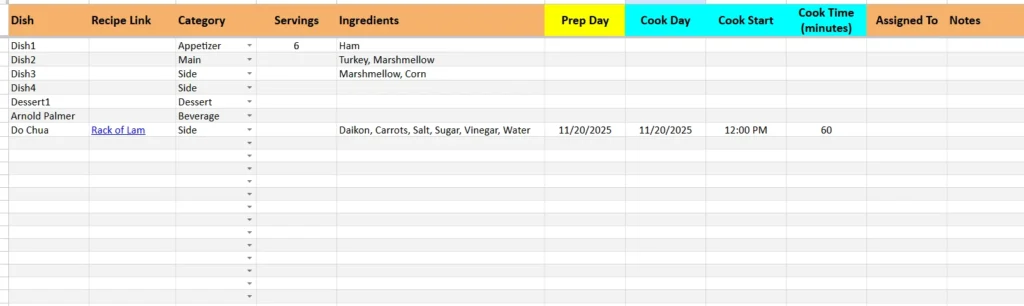
The Menu Planner sheet is the heart of your Thanksgiving template. It helps you list every dish, link recipes, and plan when to prepare each one.
Each column is designed to make planning effortless:
- Dish Name – Write the name of each recipe, like “Roast Turkey” or “Pumpkin Pie.”
- Recipe Link – Add a direct link to your recipe or cooking video.
- Category – Use the dropdown list to mark dishes as Appetizer, Main, Side, Dessert, or Beverage.
- Servings – Estimate how many people the dish feeds.
- Ingredients – List key items to buy for this recipe.
- Prep Day and Cook Day – Plan tasks across several days to avoid last-minute stress.
- Cook Start Time and Cook Time (minutes) – Schedule oven space and timing efficiently.
- Assigned To and Notes – Delegate dishes or jot reminders for yourself.
Example: You might plan “Mashed Potatoes” with 8 servings, assign prep on Wednesday, cooking on Thursday, and note “Keep warm in oven before serving.”
This sheet keeps your entire kitchen schedule visible, so nothing gets forgotten. Color-coded columns separate planning, cooking, and coordination tasks for quick scanning.
Guest List Sheet
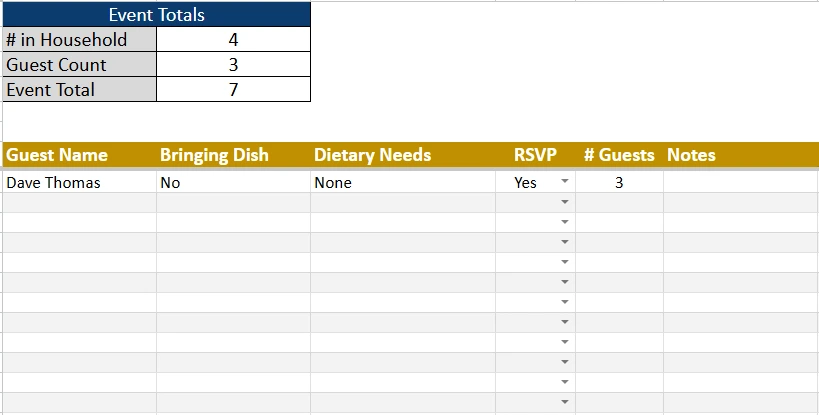
Hosting Thanksgiving often means feeding more than just your household. The Guest List sheet makes it easy to track who’s coming, who’s bringing food, and how many guests to expect.
Each line captures helpful details:
- Guest Name – Individual or family name.
- Bringing Dish – Note if they’re contributing something.
- Dietary Needs – Add details like “vegetarian” or “nut allergy.”
- RSVP Status – Use the dropdown for Yes, No, or Maybe.
- # Guests – Enter how many people are coming with each invitation.
- Notes – Record reminders such as “arriving early to help set up.”
At the top of this sheet is your Dinner Headcount Summary, which automatically updates as you enter data. It shows:
- People in Your Household – Everyone living in your home.
- Invited Guests – The total number of confirmed RSVPs.
- Total Attending Dinner – The full number of people eating on Thanksgiving.
For example, if your household has 4 people and you have 8 confirmed guests, your total dinner count will display 12. This feature ensures accurate portion planning and seating arrangements without manual math.
Dropdowns Sheet
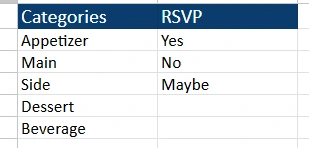
The Dropdowns sheet works quietly behind the scenes. It stores predefined lists used throughout the spreadsheet, keeping your dropdown menus consistent and easy to update.
By default, it includes:
- Categories: Appetizer, Main, Side, Dessert, Beverage
- RSVP Options: Yes, No, Maybe
You can modify these anytime. For example, add “Gravy” as its own category or include “Depends” as a custom RSVP option. This sheet makes your planner flexible without breaking formulas or filters.
How to Use the Thanksgiving Menu Planner Spreadsheet
Getting started with the template takes only a few minutes:
- Start in the Menu Planner Sheet
List your dishes in order — from appetizers to desserts. Add serving sizes and recipe links. If you’re cooking over two or three days, use the Prep Day and Cook Day columns to spread out tasks. Example: You can prep pies on Wednesday, roast turkey Thursday morning, and reheat sides right before dinner. - Add Your Guest Information
Move to the Guest List sheet and record everyone invited. If you’re hosting families, list each group on one line and fill in the “# Guests” column for accuracy. - Review Totals Automatically
Watch your Dinner Headcount Summary update instantly. You’ll see the number of household members, confirmed guests, and total people eating. This helps you decide how many servings to make or whether to scale up recipes. - Personalize Dropdowns and Notes
Open the Dropdowns sheet to adjust categories or RSVP wording. It’s also a good place to set personal reminders, like grocery deadlines or decorations.
Because it’s built in Google Sheets, you can share it with family members or friends who are helping you cook. Everyone can update their sections at the same time — no duplicate lists or confusion.
Why This Template Makes Thanksgiving Easier
The Thanksgiving Menu Planner Spreadsheet was made for people who love the holiday but not the chaos. It turns your dinner prep into a step-by-step plan that’s easy to follow and reuse each year.
Here’s why it stands out:
- It’s practical. Every column serves a clear purpose — no unnecessary complexity.
- It’s shareable. Collaborate in real time with family or helpers.
- It’s reusable. Copy it every year and simply swap out dishes or guest names.
- It’s visual. Color-coded sections keep your information readable at a glance.
- It’s realistic. Designed by spreadsheet users who understand real kitchen workflows.
Imagine checking one sheet and instantly knowing your guest count, oven schedule, and shopping needs. That’s exactly what this template provides — calm organization for a day that’s usually frantic.
It’s ideal for:
- Families hosting large gatherings
- Friends organizing potluck dinners
- Home cooks who want to manage timing and oven space
- Anyone who wants to enjoy Thanksgiving without feeling rushed
Get Your Free Thanksgiving Menu Planner Spreadsheet
- Free Template
- Fully Editable
- Instant Access
- Organize your information
How to Access Your Copy
- Enter your email for instant access
- Open the link we send you
- Start using the spreadsheet right away
Start organizing your perfect Thanksgiving dinner today — calm, clear, and fully under control.





