
Staying organized with personal responsibilities can feel overwhelming, especially when tasks span across home projects, health routines, finances, appointments, and everyday errands. A simple checklist is often not enough—you need a system that helps you prioritize, track deadlines, and see your progress at a glance. That’s exactly where this Personal To-Do List Google Sheets Template comes in.
Whether you’re managing personal goals, household chores, budget tasks, or long-term planning, this spreadsheet gives you a clean structure and smart automations that make daily organization effortless. Below, you’ll find an in-depth walkthrough of the template, how each sheet works, and why it’s ideal for anyone wanting to build better habits and stay on top of their responsibilities.
Overview of the Template
This Google Sheets Personal To-Do List is designed for individuals who want a simple yet powerful way to track everything happening in their lives. It uses structured dropdowns, automatic color coding, progress bars, and calculated fields to help you understand what’s due soon and what you’ve already accomplished.
The main sheet includes to-do items such as category, priority, start date, due date, current progress percentage, notes, and completion date. When you update your progress or status, the sheet automatically reflects those changes visually through color indicators and a progress bar.
A second sheet—Dropdowns—stores the controlled lists for categories, priority levels, and to-do statuses. These dropdowns keep your entries consistent and prevent typos or mismatched labels from breaking formulas.
Together, these two sheets form a lightweight personal planning tool that anyone can use, no matter how busy life gets.
Key Features and Sections
This template has two main sheets, each working together to create an organized, dynamic to-do list experience.
To-Do List Sheet (Main Sheet)
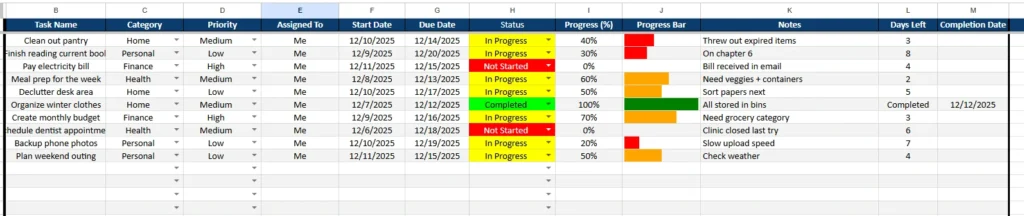
This is where all your personal tasks live. Each row represents something you want to get done—large or small. The sheet is structured to make your day clearer and your priorities easier to manage.
Here’s what each column represents:
Task Name
Describe the task you want to complete. Examples include “Clean out pantry,” “Pay electricity bill,” “Finish reading current book,” or “Backup phone photos.” Since this is a personal to-do list, the tasks revolve around your own daily life and individual goals.
Category
This dropdown groups your tasks into useful life areas such as Home, Health, Personal, or Finance. Categorizing tasks helps you see patterns and decide which part of your life needs attention. For instance, if many Home items are pending, you might dedicate a weekend morning to catching up.
Priority
Choose from Low, Medium, High, or Critical. This keeps you focused on what matters the most. High-priority items—like paying bills or finishing a time-sensitive project—stand out immediately.
Assigned To
Because this template is designed for a single person, the default value is “Me.” It’s still helpful for households where one person manages shared responsibilities and wants to track who will complete what.
Start Date and Due Date
These dates allow the template to calculate the remaining time for each task. If something is due in four days or due tomorrow, you’ll see it instantly in the “Days Left” column. This helps prevent procrastination and ensures deadlines do not sneak up on you.
Status
The status dropdown includes Not Started, In Progress, Stalled, and Completed. These values are tied to conditional formatting so you can visually scan your list:
- Not Started appears red
- In Progress turns yellow
- Stalled may appear orange
- Completed turns green
The color coding makes your to-do list more intuitive and easier to follow.
Progress (%) and Progress Bar
Entering a percentage updates a color-coded progress bar. Even seeing 20% or 50% filled can be motivating and helps you understand how much you’ve accomplished already.
Notes
Use this for reminders or context—for example:
- “Bill received in email”
- “Need containers for meal prep”
- “Clinic closed last try”
Days Left and Completion Date
These fields update automatically based on your dates and status. When a task is completed, you can add the completion date for your records.
Dropdowns Sheet
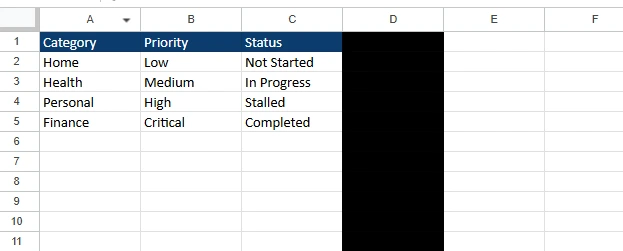
You’ll find three main dropdown lists:
- Category: Home, Health, Personal, Finance
- Priority: Low, Medium, High, Critical
- Status: Not Started, In Progress, Stalled, Completed
These lists ensure the main sheet stays consistent. Without them, typing variations like “in progress” or “In-progress” would break conditional colors or formulas.
The best part is how easy it is to customize:
- Add more categories like Fitness, Errands, Hobbies, or Travel.
- Add new priority levels if your system uses terms like “Essential” or “Optional.”
- Add new statuses like “Deferred” or “Waiting on Someone.”
Everything updates instantly in the main sheet with zero extra setup.
How to Use the Template
You can start using this To-Do List immediately, whether you’re a beginner or an experienced spreadsheet user.
Step 1: List Your To-Dos
Write everything you want to get done—weekly chores, personal goals, projects, errands, and reminders.
Step 2: Assign Categories and Priorities
Select the category from the dropdown, then choose a priority level. This helps you quickly sort your list and decide what needs attention first.
Step 3: Add Dates and Status
Add your start date and due date. Select a status like Not Started or In Progress. The color coding will instantly reflect the task’s progress.
Step 4: Update Progress
Whenever you work on something, adjust the progress percentage. This automatically updates your progress bar.
Step 5: Use Notes for Context
Add details that help you remember what’s going on with each task.
Step 6: Mark Completed Tasks
When you finish an item, set the status to Completed and log your completion date. This gives you a clear record of your productivity.
Step 7: Customize the Dropdown Sheet
Want more task categories? Need new priority levels? Just add them to the Dropdowns sheet and they’ll appear immediately in the main list.
Why Choose This Template
This To-Do List template offers several strengths you won’t find in standard checklists or apps.
It’s Ideal for Personal Use
No complicated team features, no clutter—just your tasks in one organized place.
It’s Fully Customizable
Every dropdown, color, and formula can be adapted to your routines and lifestyle.
It Uses Visual Progress Indicators
Seeing tasks turn yellow or green, or watching the progress bars fill, makes productivity feel more rewarding.
It Helps Prevent Missed Deadlines
With Days Left automatically updating, you always know what to focus on next.
It’s Accessible Anywhere
Since it lives in Google Sheets, you can check or update your to-do list on your phone, laptop, or tablet.
Conclusion
This Personal To-Do List Google Sheets Template is a simple yet powerful tool for organizing your life. With dropdowns, progress tracking, visual cues, and automated calculations, it transforms your daily routine into an organized system you can rely on.
Download the template, make it your own, and enjoy the clarity and control that comes with a well-designed personal to-do list. Whether you’re staying on top of chores, managing personal goals, or planning upcoming responsibilities, this template will help you stay focused, motivated, and productive.
If you’d like a downloadable version, a matching printable Google Docs to-do list, or graphics to promote this template on Pinterest or Instagram, I can create those too!
Get Your Free To-Do List Spreadsheet
- Free Template
- Fully Editable
- Instant Access
- Organize your information
How to Access Your Copy
- Enter your email for instant access
- Open the link we send you
- Start using the spreadsheet right away





