
Planning a vacation should be exciting, not stressful. Whether you’re heading overseas, taking a family road trip, or organizing a weekend getaway, managing your travel budget can make all the difference between a relaxing trip and a financial headache afterward.
That’s why we built this free Vacation Budget Template for Google Sheets — a simple yet powerful tool that helps you plan, track, and stay in control of your travel expenses. You can estimate costs, log actual spending, and instantly see where your money goes, all in one clean, organized spreadsheet.
Video Overview
Get Organized with a Smart Vacation Budget Planner
Before your next trip, you probably have a few key questions: How much should I save? What will flights cost? How much can I spend each day?
This vacation budget spreadsheet gives you the answers. It breaks your trip into easy-to-manage sections — from flights and accommodation to food, activities, and souvenirs. You can set goals, monitor savings, and compare your expected versus actual spending.
The template is built in Google Sheets, so it’s completely free to use, easy to edit, and works on any device. Simply open the file, make a copy, and start planning your trip right away.
Explore What’s Inside the Template
This template is organized into two main sheets: the Vacation Summary and the Dropdowns Sheet. Together, they create a complete, connected budgeting system that keeps your travel finances in order.
Vacation Summary Sheet
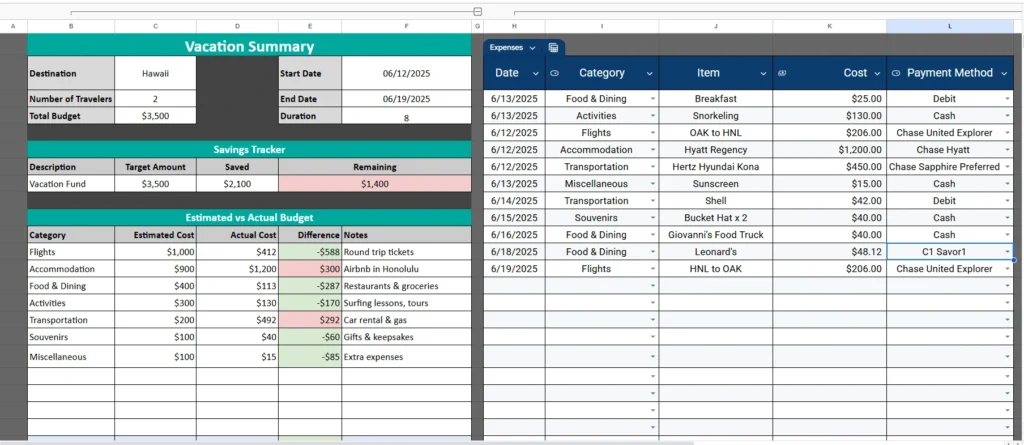
The Vacation Summary sheet is your main dashboard. It includes every tool you need to plan your trip and track your spending in real time.
Trip Overview
At the top of the sheet, you’ll find a clean section for your trip details:
- Destination (e.g., Oahu, HI)
- Start and End Dates
- Number of Travelers
- Total Budget
There’s even a built-in duration calculator that automatically shows how many days your trip will last. This helps you plan daily spending more accurately — for example, dividing a $2,800 total budget over a 7-day trip gives you about $400 per day to work with.
Savings Tracker
Below the trip overview, you’ll see a Savings Tracker. This small but powerful table helps you visualize your progress before the trip starts. You can enter your savings goal, how much you’ve already saved, and see what’s remaining.
For instance, if your vacation fund goal is $3,500 and you’ve saved $2,100, the sheet automatically shows that you have $1,400 left to reach your goal. It’s a quick motivator that keeps your planning on track.
Estimated vs Actual Budget
This is where the template really shines. The Estimated vs Actual Budget table lets you plan your spending by category and then record what you actually spend during the trip.
Categories include:
- Flights
- Accommodation
- Food & Dining
- Activities
- Transportation
- Souvenirs
- Miscellaneous
Planning to rent a car?
We recommend booking through Budget Car Rental. It costs you nothing extra, and using our link helps keep free templates like this one coming.
For each, you’ll enter an estimated cost and later fill in the actual cost. The spreadsheet calculates the difference automatically, highlighting overspending in red and savings in green.
Let’s say you estimated $900 for accommodation but spent $880 — that $20 savings shows up instantly. On the other hand, if your food budget was $400 but you spent $480, you’ll see that overage highlighted, helping you make smarter choices the rest of the trip.
At the bottom of the table, the template totals your estimated and actual costs, showing exactly how close you stayed to your plan.
Expense Log
Connected to the budget summary is an Expense Log, where you can record every transaction by date. Each entry includes:
- Date
- Category
- Item description
- Cost
- Payment method
Because it uses data validation from the dropdowns sheet, adding expenses is quick — just pick the category or payment type from a drop-down menu. This makes the sheet ideal for on-the-go use from your phone or tablet during travel days.
Dropdowns Sheet
The second sheet is the engine behind your dropdown menus. It’s simple but crucial for keeping your main sheet organized and consistent.
You’ll see two columns:
- Spending Categories: Flights, Accommodation, Food & Dining, Activities, Transportation, Souvenirs, Miscellaneous
- Payment Methods: Cash, Debit, AMEX, Chase Sapphire Preferred, Chase United Explorer, etc.
You can easily customize these lists to fit your travel style. For example, if you’re backpacking through Europe, you might add “Rail Pass” or “Hostels.” For a family trip, you could include “Theme Park Tickets” or “Car Rental.”
Once edited, these dropdowns automatically update throughout the main sheet — no need to re-enter information manually.
How to Use the Vacation Budget Template
Using this Google Sheets template is simple — even if you’re not a spreadsheet expert.
- Enter your trip details.
Add your destination, dates, number of travelers, and total budget. - Set up your estimates.
Use the Estimated vs Actual Budget section to plan out expected costs for flights, lodging, food, and activities. - Track your savings.
Update your vacation fund total as you save toward your goal. - Log expenses during the trip.
Each time you spend, add the date, category, item, and amount. The totals and difference calculations update automatically. - Review your totals.
Once your trip is done, you’ll have a clear overview of your total spending, savings, and category-by-category breakdown.
You can easily duplicate the sheet for future trips, rename each tab, or create a new copy for different travel plans.
Why This Template Is Perfect for Travelers
The Vacation Budget Template was designed for people who want structure without overcomplication.
Here are a few realistic ways people use it:
- Families use it to plan multi-stop vacations, keeping track of shared expenses and deposits.
- Couples use it to stay on budget for honeymoons or anniversary trips.
- Solo travelers love it for tracking backpacking trips or weekend adventures.
- Groups of friends use it to split costs fairly, since each person can access the same Google Sheet.
Because it’s fully editable, you can add new categories, daily expense summaries, or even graphs to visualize spending over time. It’s practical, flexible, and easy to share.
Plan Smarter, Travel Easier
This vacation budget planner helps you see the full picture of your travel finances — before, during, and after your trip. By setting clear estimates, tracking expenses as they happen, and comparing totals at the end, you can enjoy your vacation without worrying about going over budget.
Every formula and dropdown is already set up, so all you need to do is enter your numbers. You’ll instantly know whether you’re spending too much or right on target.
Planning to rent a car?
We recommend booking through Budget Car Rental. It costs you nothing extra, and using our link helps keep free templates like this one coming.
Get Your Free Vacation Budget Spreadsheet
- Free Template
- Fully Editable
- Instant Access
- Organize your information
How to Access Your Copy
- Enter your email for instant access
- Open the link we send you
- Start using the spreadsheet right away
Make your own copy, personalize it for your trip, and see how simple — and satisfying — budgeting your vacation can be.





