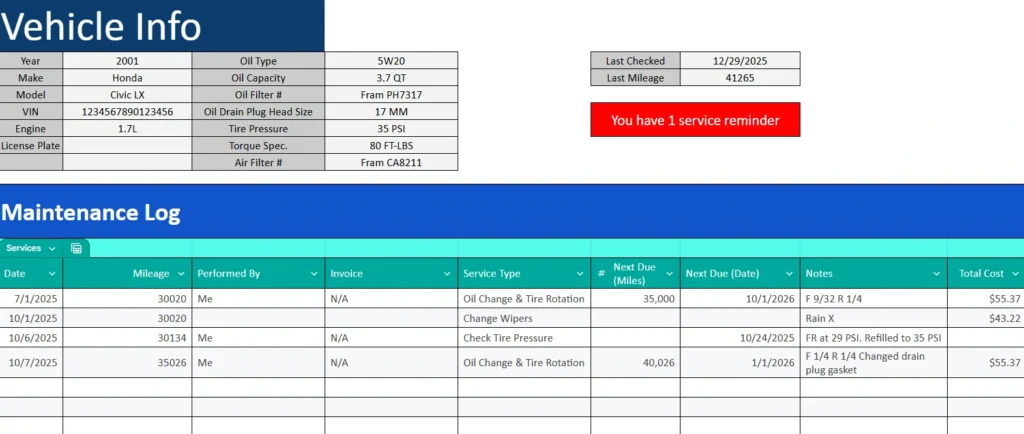
If you own a car, you know how easy it is to lose track of oil changes, tire rotations, or inspections. Receipts pile up, service intervals vary, and before you know it, you’re wondering when the last brake job was done.
That’s where this Car Maintenance Spreadsheet comes in. Designed in Google Sheets, it’s an easy-to-use, automated template that helps you log every service, see what’s due next, and keep your vehicle in top shape — all without the hassle of apps or complicated systems.
Whether you’re a daily driver, a DIY mechanic, or managing multiple vehicles, this spreadsheet provides a simple, reliable way to stay on top of your maintenance schedule and budget.
A Complete Overview of the Car Maintenance Spreadsheet
This spreadsheet includes everything you need to manage vehicle maintenance in one file. It’s divided into two main sheets: a Maintenance Log for entering your vehicle and service details, and a Reminders sheet that automatically shows what’s coming up next.
Unlike generic car tracking templates, this one features a clean, color-coded design and a built-in service reminder notification that changes color based on your vehicle’s status. When everything is up to date, you’ll see a calming green “No services due” banner. When a maintenance task is approaching or overdue, that banner turns bright red with a message like “You have 1 service reminder.”
You don’t need to touch any formulas or make adjustments — just fill in your vehicle details, add your service entries, and the spreadsheet takes care of the rest.
Explore the Template’s Key Features and Sections
Maintenance Log Sheet
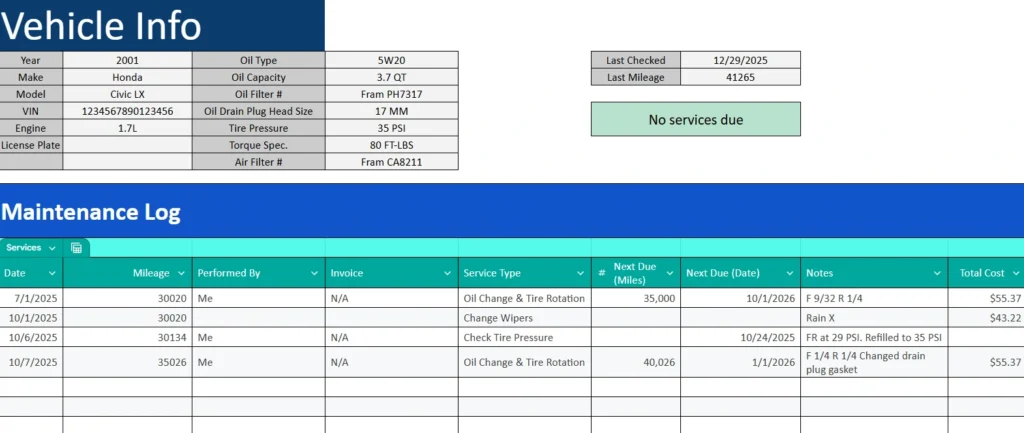
The Maintenance Log is the heart of the spreadsheet. It’s where you’ll record everything about your vehicle — from routine oil changes to major repairs.
At the top, you’ll find a Vehicle Info section that serves as a quick reference for essential details like:
- Year, make, and model
- Engine size and oil type
- Oil filter number and drain plug head size
- Tire pressure and torque specifications
- Air and cabin filter numbers
- Last checked date and mileage
This makes it easy to keep manufacturer specs and part numbers in one place, so you don’t have to look them up every time you service your car.
Next to the vehicle info panel, the Service Reminder Notification stands out as your real-time maintenance indicator. When your car is fully up to date, it shows a green “No services due” message. But as soon as an upcoming or overdue service is detected, it turns red and displays a clear message such as “You have 1 service reminder.” It’s an immediate, visual cue that keeps you aware of your car’s needs at a glance.
Below this, the Maintenance Table lets you log every service entry in a clear, structured layout. Each column is designed for practical use:
- Date – When the service was completed.
- Mileage – Odometer reading at the time of service.
- Performed By – Who did the work (you, a shop, or mechanic).
- Invoice – Record invoice numbers or “N/A” if none.
- Service Type – Select from your list of common tasks (like oil change, tire rotation, brake pads).
- Next Due (Miles) – When the next service should happen based on mileage.
- Next Due (Date) – When the service is due by time.
- Notes – Space for details such as parts used, tire positions, or special observations.
- Total Cost – Track the cost for each job to help you understand your maintenance expenses over time.
The clean layout and subtle color coding make it easy to scan your records, compare past services, and know exactly when each type of maintenance is coming up next.
Reminders Sheet
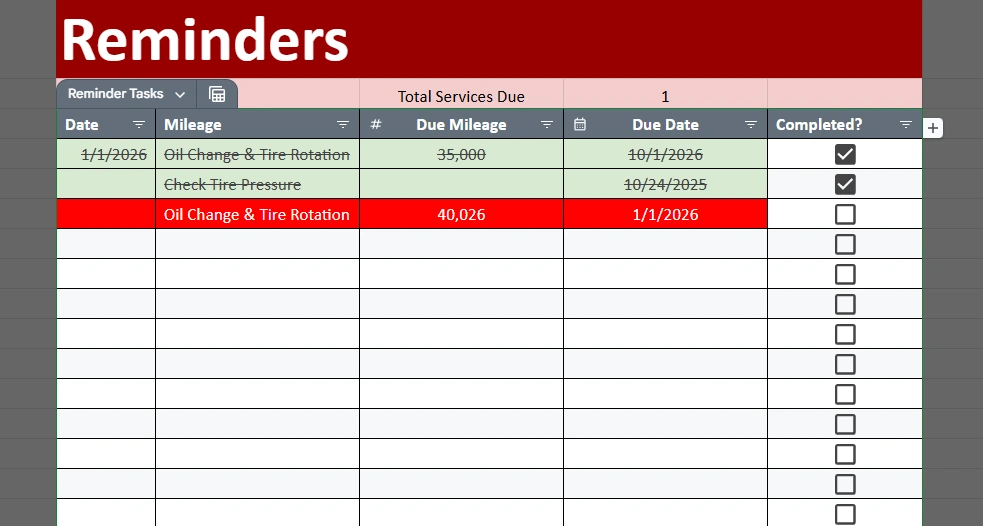
The Reminders sheet is where the spreadsheet’s automation shines. It automatically lists upcoming or overdue services from your Maintenance Log based on the “Next Due” fields you enter.
Each row represents a service task, along with its due mileage, due date, and a Completed? checkbox. The sheet is color-coded to show the status of each task:
- Red – The service is due or overdue.
- Green with strikethrough – The service has been marked completed.
When you check a box, the row instantly turns green and your Maintenance Log’s reminder banner updates to reflect the change. This makes it easy to see, at a glance, which vehicles or services still need attention.
This system works beautifully for individuals tracking one car or for small businesses managing a handful of vehicles. For fleet owners, it can also be expanded to track multiple vehicles using dropdowns for “Vehicle Name” or “PM Type.”
How to Use the Car Maintenance Template
You don’t need any special skills to use this spreadsheet — everything is already formatted and ready to go. Here’s how to make the most of it:
- Start with your vehicle details.
Enter your car’s make, model, and specifications in the Vehicle Info section. This keeps all your reference data in one convenient spot. - Log your maintenance history.
Add your most recent services — such as your last oil change, brake pad replacement, or tire rotation — in the Maintenance Table. Fill in the “Next Due” fields so the reminder system knows when to flag future tasks. - Check your reminders.
Visit the Reminders sheet to see all upcoming or overdue services. Red rows mean something’s due; green means you’re good to go. - Stay current.
Each time you perform maintenance, mark it completed by checking the box in the Reminders sheet and adding the new entry in your Maintenance Log. The red notification on the main sheet will disappear automatically. - Review your costs and schedule.
Use the “Total Cost” column to track how much you’re spending on maintenance. Over time, this gives you valuable insight into which repairs cost the most and helps plan for future service expenses.
This process ensures you never miss a critical service again — and gives you a clear maintenance history you can reference for resale, warranty claims, or fleet reporting.
Why This Car Maintenance Spreadsheet Stands Out
Many vehicle tracking templates focus only on expenses or mileage logs, but this one combines service scheduling, cost tracking, and automatic reminders in one cohesive tool.
It’s ideal for:
- Individual car owners who want an easy digital record of maintenance.
- Families with multiple cars trying to manage staggered service intervals.
- Fleet managers who need a simple, shareable system to monitor several vehicles.
- DIY mechanics who prefer keeping their service notes, part numbers, and torque specs in one organized place.
The design balances structure with flexibility — you can add rows, rename vehicles, or even customize PM (preventive maintenance) categories to match your own schedule. Because it’s Excel-based, it works offline and doesn’t require logins or subscriptions.
Every aspect of the template is built for clarity: clear fonts, color-coded alerts, dropdown menus for consistency, and locked formulas so you can’t accidentally overwrite important calculations.
Get Your Free Vehicle Maintenance Spreadsheet
- Free Template
- Fully Editable
- Instant Access
- Organize your information
How to Access Your Copy
- Enter your email for instant access
- Open the link we send you
- Start using the spreadsheet right away