
Planning a wedding can be exciting — but keeping track of every guest, RSVP, table, and meal choice can quickly become overwhelming. That’s where an organized, automated spreadsheet can make all the difference.
This free Wedding Guest List Template for Google Sheets helps couples, wedding planners, and event coordinators manage everything from invitations to seating arrangements in one simple, color-coded dashboard.
Instead of juggling paper notes, email threads, and last-minute text messages, you can manage your entire guest list from one live, shareable spreadsheet that updates itself as you go.
Video Walkthrough
Stay in Control of Every Detail
This template is built for anyone who wants to bring structure and calm to their wedding planning process. It’s easy enough for first-time spreadsheet users but detailed enough to handle large guest lists.
You can track RSVPs, categories (family, friends, coworkers, etc.), table numbers, and dietary restrictions — all while watching automatic summaries update at the top of your sheet. The layout is clean and designed to make sense at a glance, whether you’re managing 30 guests or 300.
The sheet is divided into three sections:
- Guest List – where you input and organize all guest information
- Table Summary – a quick snapshot of how many seats are filled at each table
- Dropdowns – your customization area for RSVP statuses, categories, and table numbers
Each part works together, so when you update one area, the others automatically reflect those changes.
What’s Inside the Wedding Guest List Template
This isn’t just a blank spreadsheet with rows and columns. The template comes pre-formatted with formulas, dropdowns, and summaries that do the heavy lifting for you.
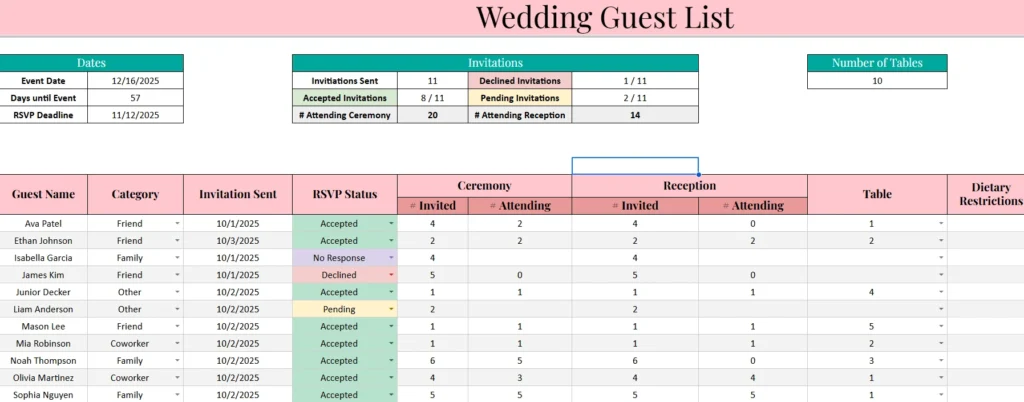
You can also set your event date and RSVP deadline on this sheet. The main dashboard uses these inputs to calculate days remaining and highlight important dates automatically.
1. Guest List Sheet
This is the heart of the template. It’s where you’ll enter guest names, categorize them, and manage RSVPs. The top portion of the sheet includes helpful summaries that update automatically as you make changes — things like total invitations sent, accepted, declined, and pending.
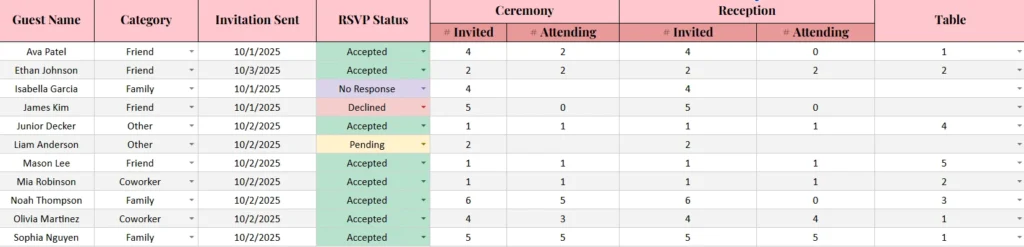
Below that summary, you’ll find the detailed guest table. Each guest (or group) gets their own row, with columns for:
- Guest Name
- Category (Family, Friend, Coworker, or Other — all customizable)
- Invitation Sent date
- RSVP Status (Accepted, Declined, Pending, or No Response)
- Ceremony Guests (# Invited and # Attending)
- Reception Guests (# Invited and # Attending)
- Assigned Table
- Dietary Restrictions
Every dropdown is linked to the Lists sheet, so you can easily update available options. The template uses color-coded RSVP statuses — green for Accepted, red for Declined, yellow for Pending, and purple for No Response — so you can see who’s confirmed at a glance.
At the top of the sheet, there’s also a countdown for your Event Date and RSVP Deadline, helping you visualize how many days remain. If your RSVP deadline is getting close, the countdown turns red automatically to catch your attention.
This thoughtful design makes it easy to spot what needs your attention — whether that’s following up on pending RSVPs or adjusting your seating chart.
2. Table Summary Sheet
Once guests start confirming, the Table Summary sheet comes to life. It automatically counts how many guests are seated at each table based on their table assignment in the Guest List.
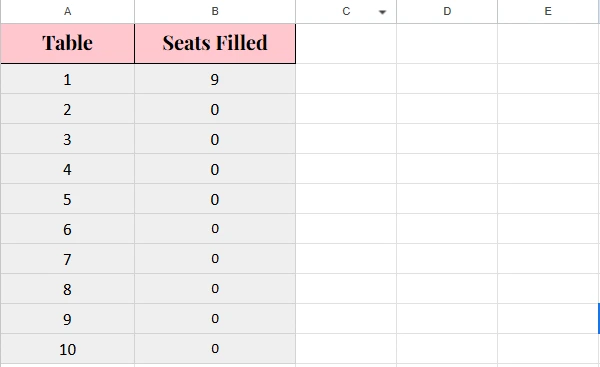
This gives you a real-time overview of which tables are filling up and which still have space. If you change a guest’s table in the main list, this sheet instantly updates — no manual math required.
For example, if you move “Ethan Johnson” from Table 2 to Table 6, the summary immediately reflects the change, showing that Table 2 now has fewer seats filled and Table 6 has more.
This feature is particularly helpful for couples or coordinators finalizing seating arrangements the week before the wedding. You’ll always know exactly how many guests are at each table.
3. Dropdowns Sheet
The Dropdowns sheet keeps your main sheet clean and flexible. Here, you can edit the lists that appear in your dropdown menus — such as RSVP statuses, guest categories, and table numbers.
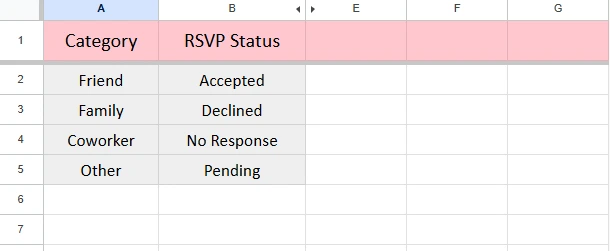
If you have unique groups (like “Bride’s Family,” “Groom’s Friends,” or “Vendors”), you can add them here. The template automatically pulls from this list, so your changes appear in every dropdown menu throughout the file.
How to Use the Wedding Guest List Template
Getting started is easy, even if you’re not familiar with Google Sheets.
- Enter Event Details
Add your wedding date, RSVP deadline, and number of tables in the designated cells. The sheet will automatically calculate how many days are left until your event. - Add Guest Information
Begin entering guest names, categories, and invitation dates. You can do this gradually as your guest list develops. - Track RSVPs
As replies come in, update each guest’s RSVP status from the dropdown. The totals and color indicators will adjust automatically. - Assign Tables
Once you know who’s attending, assign table numbers from the dropdown menu. The Table Summary will instantly update to show how many seats are filled per table. - Review and Share
You can share the spreadsheet with your partner, planner, or caterer for easy collaboration. Because it’s cloud-based, everyone can view updates in real time.
By the time your RSVP deadline arrives, you’ll have a complete, organized picture of your guest list, seating plan, and attendance numbers — all without sorting through piles of paper or multiple apps.
Who This Template Is Perfect For
- Engaged couples who want to stay organized without learning advanced spreadsheet skills.
- Wedding planners managing multiple events or large guest lists for clients.
- DIY organizers planning receptions, bridal showers, or engagement parties who want to track details digitally.
- Venue coordinators who need a quick way to communicate attendance numbers to staff.
It’s also great for destination weddings, where multiple people might need to update the guest list remotely — parents, planners, or coordinators can all collaborate in real time.
Why This Template Makes Wedding Planning Easier
There are dozens of wedding spreadsheets online, but this one stands out because it’s practical, automated, and simple.
You don’t need to understand formulas — everything works behind the scenes. The template handles the math, so you can focus on the planning.
A few reasons couples love it:
- No setup required: Everything is ready to go. Just copy the file and start adding guests.
- Error-proof formulas: You’ll never double-count or forget someone.
- Clear summaries: Key numbers update automatically so you always know where you stand.
- Easy collaboration: Share the sheet with your partner or planner for live updates.
- Customizable lists: Tailor categories and statuses to match your needs.
In short, it’s built to save you time, prevent mistakes, and give you peace of mind during an already busy planning season.
Get Your Free Wedding Guest List Template
- Free Template
- Fully Editable
- Instant Access
- Organize your information
How to Access Your Copy
- Click the download button below
- Enter your email for instant access
- Start using the spreadsheet right away
The Wedding Guest List Template (Google Sheets) is free and simple to use. Whether you’re planning an intimate backyard celebration or a grand event with hundreds of guests, this tool helps you stay organized from invitation to reception.
Get it today, make your copy, and start tracking your guest list with confidence. Once you see how easy it is to manage RSVPs, seating, and deadlines in one place, you’ll wonder how anyone plans a wedding without it.





