
Planning meals week after week can feel overwhelming, especially when you’re juggling work, family, and a busy schedule. That’s exactly why this Weekly Meal Plan Template for Google Sheets exists. It gives you a clean, organized space to plan Breakfast, Lunch, Dinner, and snacks for every day of the week—while staying flexible enough to adapt to your needs. Whether you’re cooking for one, feeding a family, or trying to simplify grocery shopping, this template makes meal planning faster and more enjoyable.
The template is designed with two fully editable sheets. The first is the Weekly Meal Plan, which acts as your main planning dashboard. It includes dropdown meal chips, color-coded options, and the ability to select multiple meals in the same cell. The second is the Meals Dropdown Sheet, where you can list all your meals, add optional recipe links, and store ingredients. When you update that list, the dropdown menus in the weekly planner automatically update as well.
This combination creates a lightweight but powerful system: you plan your week visually, and behind the scenes, your meal database keeps everything consistent. No additional formulas, no complicated setup—just simple, intuitive organization.
Whether you’re a student trying to control food spending, a parent balancing multiple diets, or someone who wants a more intentional weekly routine, the template gives you a structure that works without getting in your way.
Key Features and Sections
Weekly Meal Plan Sheet
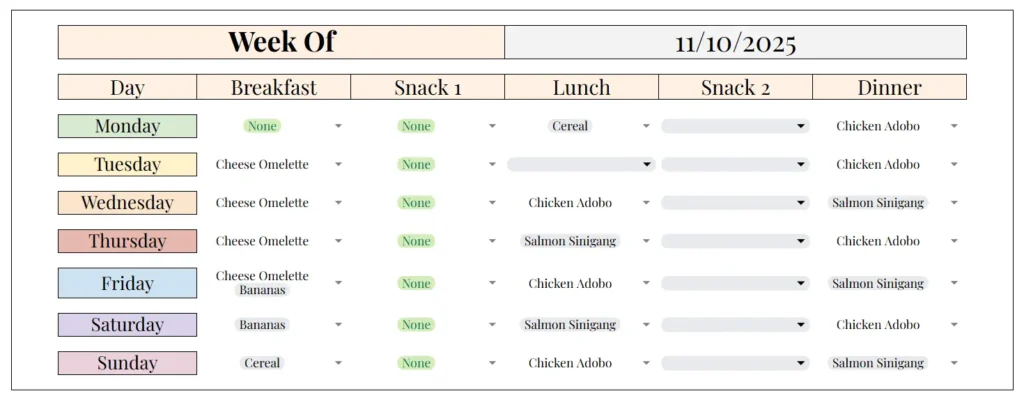
The Weekly Meal Plan sheet is the first thing users will see, and it’s designed to feel clear and welcoming. At the top, you’ll see a “Week Of” field that can be changed manually to represent any week you want to plan. Beneath that is a full Monday-through-Sunday layout with dedicated rows for Breakfast, Snack 1, Lunch, Snack 2, and Dinner.
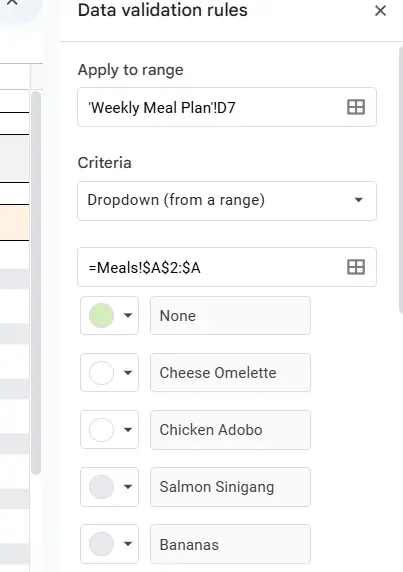
Each cell includes a dropdown menu pulled directly from your Meals sheet. The template uses Google Sheets’ chip-style dropdowns, which look clean, display color options, and allow multiple selections. For example, if someone wants to log “Eggs” and “Toast” together, they can select both without typing anything.
Each day of the week is lightly color-coded, giving the sheet a balanced visual structure. This makes it easy to look across the week and understand what you’ve planned at a glance. Someone who batch cooks large meals can quickly see where leftovers appear throughout the week. Someone following a specific diet, like Mediterranean or vegetarian, can color-code meal types to ensure variety.
This sheet is also built to be duplicated. At the start of a new week, users can right-click the sheet tab, duplicate it, rename it with the new date, and start again while keeping an archive of previous weeks.
Meals Dropdown Sheet

The second sheet is the engine that powers the template. The Meals Dropdown sheet includes three columns: Meal Name, Recipe Link, and Ingredients. The Meal Name column is the only required field. Every dish listed here automatically becomes an option in the dropdown selector on the weekly planner.
Users can add as many meals as they want to this list. Some people use it as a “master recipe list”; others create seasonal lists and switch them out throughout the year. The Ingredients column is optional, but incredibly useful for people who want quick reminders without opening recipe websites. For example, “Chicken Adobo” might have ingredients like Chicken, Soy Sauce, Vinegar, Garlic, Onion, Bay Leaves, Peppercorn, making it easy to double-check if you already have everything on hand.
The Recipe Link column allows you to store URLs to recipes from blogs, YouTube videos, or personal sites. These links act as quick shortcuts when you’re ready to cook or prepare grocery lists. Many users create a personal collection of frequently used recipes, turning this sheet into a miniature digital cookbook.
Because everything is powered by this sheet, any updates you make—new meals, new recipes, new ingredients—automatically flow into the Weekly Meal Plan. There’s no need to rewrite anything or adjust formulas.
How to Use the Template
Using the Weekly Meal Plan Template is straightforward, even for beginners. Start by visiting the “Meals Dropdown” sheet and listing out all the meals you regularly make. These might include simple items like “Bananas,” breakfast staples like “Cheese Omelette,” or full dinner meals like “Salmon Sinigang.” Add recipe links for dishes you prepare often or want to revisit later.
Once your list is ready, return to the Weekly Meal Plan sheet. Begin filling in each meal slot by selecting from the dropdown menus. If you want multiple items in a single meal slot—like pairing oatmeal with fruit—you can select both. Google Sheets will display each one as a small, colored chip.
One of the advantages of this setup is flexibility. If you’re planning for children and adults with different diets, you can list multiple options in the same meal slot. If you cook big dinners and stretch leftovers into lunches the next day, simply pick the same meal from the dropdown for multiple time slots. This reflects your real-life routines without requiring extra formatting.
Many users also like to customize the colors of each meal in the dropdown chips. For example, all vegetarian meals might be green, protein-heavy meals blue, or quick meals yellow. This is especially helpful if you’re trying to improve nutritional variety. With a single glance, you can see whether your week is balanced or needs adjustment.
When the week ends, you don’t need to delete anything. Instead, duplicate the sheet, rename it with the next Monday’s date, and continue building your archive. Over time, this becomes a valuable record of what you actually eat. Some families review past weeks to repeat menu rotations, while others use previous weeks to identify recurring favorites or plan grocery budgets more accurately.
Why Choose This Template
This template was built for real-world use, not just design. It’s ideal for people who want structure but don’t have time for complex systems. The dropdown-driven format eliminates typing, reduces errors, and keeps the sheet clean. Even someone with very little spreadsheet experience can use it within minutes.
It’s especially helpful for:
- Busy families who need to coordinate meals with school schedules
- Meal preppers who batch cook on weekends
- People tracking their nutrition or trying to eat more intentionally
- Beginners in the kitchen who want easy access to recipe links
- Anyone trying to reduce food waste by planning ahead
The template works online and offline, on laptops, tablets, and phones. And because it’s built in Google Sheets, you can share it with partners, family members, or roommates.
Overall, this template blends simplicity with customization. It’s clean enough for minimalists, powerful enough for organized planners, and flexible enough to adapt to any lifestyle.
Conclusion
If you want a simple, effective way to organize your meals each week, this Weekly Meal Plan Template for Google Sheets is a dependable choice. It helps you avoid last-minute decisions, stay organized, and create a smoother routine around food and cooking. With dropdown meal chips, customizable colors, and a fully editable meal database, it supports a wide range of planning styles.
Feel free to make it your own—add more meals, store recipe links, adjust colors, or duplicate weekly sheets to build your long-term archive. When you’re ready, you can get the template instantly and start planning your week with confidence.
Get Your Free Weekly Meal Plan Spreadsheet
- Free Template
- Fully Editable
- Instant Access
- Organize your information
How To Access Your Copy
- Enter your email for instant access
- Open the link we send you
- Start using the spreadsheet right away





