
Staying organized is easier when your entire week fits neatly into one place. This Weekly Planner Spreadsheet in Google Sheets is designed to help you map out tasks, track goals, and reflect on achievements — all from one clean, easy-to-use layout.
Unlike generic planners, this version uses checkboxes that automatically apply strikethrough formatting when you complete a task. The visual feedback makes it perfect for anyone who likes to see progress at a glance, whether you’re managing work projects, family schedules, or personal habits.
If you’ve ever tried to keep track of your week using sticky notes, notebooks, or mobile apps but felt overwhelmed, this spreadsheet offers a refreshing balance of simplicity and structure. It’s digital, printable, and 100% customizable — the kind of tool you’ll actually look forward to using every Monday morning.
A Closer Look at the Weekly Planner Template
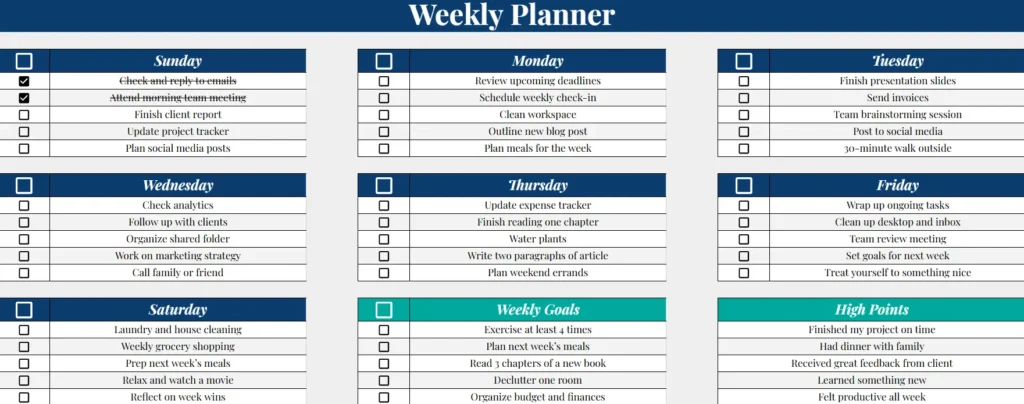
This weekly planner spreadsheet is organized into nine color-coded sections that make your entire week visible at a glance. The layout has been optimized for both Google Sheets and printable formats, with navy headers, subtle shading, and plenty of writing space for each day.
Sunday to Saturday Daily Sections
Each day of the week has its own card-style section. Inside each one, you’ll find five to-do rows with clickable checkboxes. When you check off a task, the spreadsheet automatically adds a strikethrough to the text — a small touch that makes completion feel satisfying and keeps your view tidy.
You can easily add more rows by inserting new lines under any day. Common uses include:
- Work Planning: List your top priorities for each workday, such as meetings, reports, or deadlines.
- Personal Tasks: Track household chores, appointments, or errands.
- Study Schedule: Organize lectures, study sessions, and assignments.
- Fitness Routines: Assign different workouts or self-care activities to each day.
For example, a student might write “Finish history essay” under Tuesday, “Review biology notes” under Wednesday, and “Submit assignment” under Friday. A remote worker could use it for daily focus tasks like “Reply to client emails,” “Prepare team update,” or “Draft proposal outline.”
The spreadsheet’s flexible structure works for virtually any routine — you can use it for professional productivity or simple home organization.
Weekly Goals Section
The Weekly Goals box sits at the bottom left corner of the planner and gives you space to write up to five goals. These might be short-term habits or broader intentions for the week ahead.
For instance:
- Exercise at least four times
- Read three chapters of a book
- Plan meals for the week
- Declutter one room
- Organize budget and finances
By separating goals from daily tasks, this section helps you focus on what really matters. You can glance at it throughout the week and realign your tasks with your priorities.
High Points Section
The High Points section (bottom right) acts as a reflection space. At the end of each week, you can record what went well, what you accomplished, or small moments worth remembering.
This could include things like:
- Completed a big project before deadline
- Tried a new recipe and it turned out great
- Had dinner with friends after a busy week
- Stayed consistent with workouts
- Finally organized your digital files
Many users find this section motivating because it transforms the planner from a simple task list into a personal record of progress. It’s also a great way to build a positive weekly review habit.
How the Weekly Planner Spreadsheet Works
Even if you’ve never customized a spreadsheet before, this one is simple to use. It’s built entirely in Google Sheets, which means you can access it from any device and make changes in real time.
- Make a Copy
Click “File → Make a copy” to create your own editable version. This ensures you don’t modify the original template. - Start Planning Your Week
Begin by adding tasks under each day. You can type freely or copy the sample task lists provided below. - Use the Checkboxes
Each task line includes a checkbox on the left. When you click it, the text automatically turns gray and gains a strikethrough, marking it complete. - Add More Rows
Need extra space? Right-click a row and select “Insert row below.” The formatting and checkbox formulas will copy automatically. - Customize Colors and Fonts
Change the header or accent colors to match your personal style or your company branding. Many users like to color weekends differently or use a unique shade for high-priority days. - Print or Share Digitally
The template is optimized for printing. You can also share it directly with teammates or family members in Google Sheets for collaborative planning.
Real-World Examples of How People Use This Template
Because it’s so flexible, the Weekly Planner Spreadsheet adapts to almost any type of schedule or lifestyle.
For Students:
Use each daily box to break down coursework or study goals — for example, “Watch lecture video,” “Complete math worksheet,” or “Group project meeting.” The checkboxes make progress easy to track between classes.
For Freelancers or Small Business Owners:
Plan deliverables, meetings, and invoicing. You can even duplicate the sheet for each client or week, keeping all your timelines in one place.
For Families:
Assign household chores or family activities by day. One row might say “Pick up groceries,” another “Soccer practice,” and another “Family dinner night.”
For Wellness Tracking:
Record daily habits such as sleep, hydration, meditation, or workouts. The visual format helps you see patterns and stay consistent.
Each user can tweak the spreadsheet to suit their personal workflow — you might even link it to other templates like a budget tracker or meal planner for a complete weekly overview.
Why This Planner Works Better Than a Standard To-Do List
Many digital task apps focus on long lists but fail to give you a clear sense of time. This spreadsheet is different — it encourages weekly thinking. By organizing everything into visible daily boxes, you can plan realistically, balance your workload, and avoid burnout.
It also doubles as a reflection tool. Checking off tasks and seeing them cross out provides immediate satisfaction and tangible proof of progress. Over time, this visual feedback helps build momentum and discipline.
Because it’s built in Google Sheets, it’s endlessly customizable. You can:
- Add conditional formatting for color-coded priorities.
- Insert a date range or week number at the top.
- Create dropdowns for task categories (Work, Personal, Fitness).
- Duplicate the sheet for future weeks and archive old ones.
Unlike printed planners, you’ll never run out of space — and unlike complex productivity apps, it’s completely free and intuitive.
Why Choose This Weekly Planner Template
When designing this template, the goal was to make something anyone could use immediately — no formulas to figure out, no hidden cells, no clutter. Everything is visible, logical, and functional.
Some of the small details that make it stand out include:
- Automatic formatting that applies a strikethrough when checkboxes are ticked.
- Balanced layout with two bottom sections for goals and reflections.
- Professional navy-blue theme that looks clean in both digital and print versions.
- Compatibility with Google Sheets, Excel, and mobile view.
- Easy customization without affecting the formulas or layout.
If you run a business or blog, you can even share it with your team or readers. It’s a great fit for professionals who like structured planning but still want flexibility to adapt it for different purposes — from managing projects to tracking self-care habits.
Get Your Free Weekly Planner Spreadsheet
- Free Template
- Fully Editable
- Instant Access
- Organize your information
How to Access Your Copy
- Enter your email for instant access
- Open the link we send you
- Start using the spreadsheet right away
Whether you’re a student managing classes, a freelancer juggling projects, or simply someone who wants to stay consistent with personal goals, this Weekly Planner Spreadsheet is a simple, free, and effective way to stay organized.





