Keeping track of your stock can be stressful when you don’t have a system in place. Whether you’re running a small shop, managing office supplies, or organizing household items, having a reliable inventory spreadsheet helps you stay in control. It lets you see what you own, what’s running low, and how much your inventory is worth—all in one simple dashboard.
To make things easier, I created a free Inventory Spreadsheet Template that works in both Google Sheets and Microsoft Excel. It’s designed for small business owners, freelancers, home organizers, or anyone who wants a clean, flexible way to track their items. In this post, you’ll learn how the spreadsheet works, how to use it, and how you can customize it to match your needs.
A Simple Overview of the Inventory Spreadsheet Template
This spreadsheet was built with everyday users in mind—no complicated formulas, no fancy scripts. Everything runs with simple logic that anyone can understand and edit.
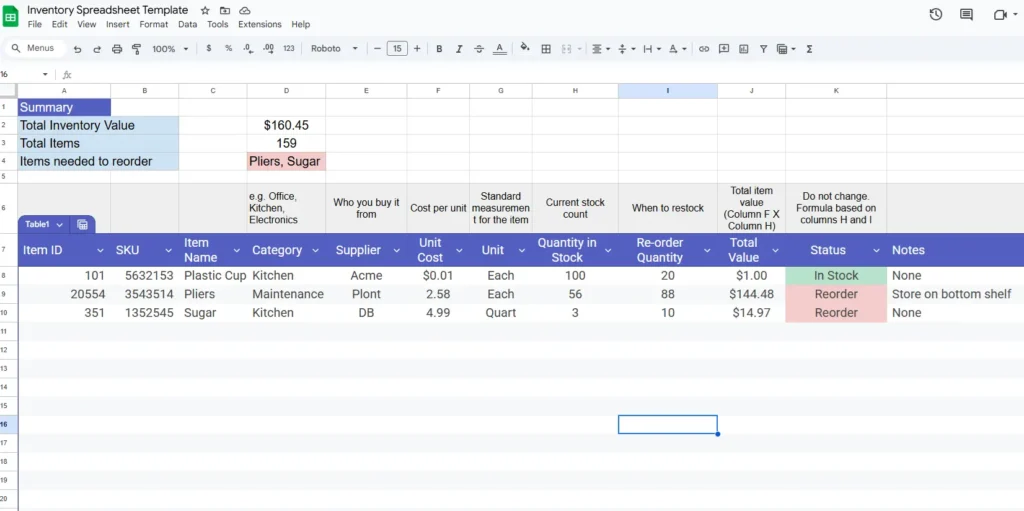
At its core, the template helps you record every item you own along with key details such as its purchase date, category, cost, supplier, and current stock. As you update your stock quantities, the spreadsheet automatically calculates total values and even alerts you when it’s time to reorder.
Each item appears in a clean row format, so you can filter, sort, or search by any category. The summary section at the top gives you a quick overview of your total inventory value, how many items are in stock, and how many need to be restocked.
The design is practical, flexible, and suitable for different use cases—retail stores, restaurants, office inventory, resellers, or even people tracking personal collections like books, tools, or art supplies.
Key Features and What Each Section Does
The Inventory Spreadsheet is divided into structured sections that make tracking and reporting simple. Here’s how each part works:
Item Details Section
This is where you record each product or supply. The main columns include:
- Item ID: Automatically generated to help you reference products easily.
- Item Name: The product or supply name.
- Category: Useful for sorting items like Electronics, Office, Cleaning, etc.
- Supplier: Helps you remember where you purchased the item from.
- Purchase Date: Keeps a log of when the item was bought or restocked.
Stock and Value Section
These columns calculate the financial side of your inventory:
- Unit Cost: The price per item.
- Quantity in Stock: How many units are currently available.
- Reorder Level: The minimum amount before a restock is needed.
- Total Value: Automatically calculated with
=F2*G2, multiplying cost by quantity. - Status: Uses a simple formula to show “In Stock” or “Reorder.”
Conditional formatting colors the “Status” column automatically—green when stock is healthy and red when it’s time to reorder. This helps you identify shortages at a glance.
Summary Dashboard
At the top of the sheet, you’ll find:
- Total Inventory Value:
=SUM(I2:I) - Items to Reorder:
=COUNTIF(J2:J,"Reorder") - Total Number of Items:
=COUNTA(B2:B)
This dashboard updates in real time, giving you instant insight into your stock health and value.
How to Use the Inventory Spreadsheet in Google Sheets
The template is ready to use right away, even if you’ve never built a spreadsheet before. Follow these steps to get started:
- Enter Your Inventory Items
Replace the sample data with your real inventory. Each row represents one product, tool, or supply. Include the item name, category, quantity, and cost to start seeing your total values. - Set Your Reorder Levels
In the “Reorder Level” column, set the minimum quantity for each item. For example, if you want to restock when a product drops below 10 units, enter “10.” When your stock quantity falls to or below that level, the “Status” column will automatically show “Reorder.” - Check the Summary Dashboard
As you fill in your data, the totals at the top will automatically update. You’ll instantly see how much your stock is worth and how many products need to be replenished. - Update Regularly
Each time you buy or sell items, update the quantity column. The sheet will do the math for you, showing accurate totals and alerting you when it’s time to reorder.
This setup works well for businesses that need an affordable, easy-to-manage system. You don’t need software subscriptions—just a single spreadsheet that grows with your needs.
Customizing the Template for Your Workflow
One of the best parts of using spreadsheets is flexibility. You can easily modify the Inventory Spreadsheet Template to fit your exact use case. Here are some ideas:
- Add New Columns: Include SKU numbers, product images, location, or expiration dates.
- Filter by Category: Use Google Sheets filters to view items by type, supplier, or availability.
- Add Drop-Down Menus: In the Category or Status columns, create data validation lists for consistency.
- Use Conditional Formatting: Highlight low-stock items in red or display expensive items in bold.
- Convert to Excel: If you prefer Excel, just export it as a
.xlsxfile. All formulas will work the same way.
If you manage multiple locations, you can even create a separate sheet for each branch and use a master summary tab to combine totals with simple IMPORTRANGE or SUM formulas.
Why This Inventory Template Stands Out
Many inventory spreadsheets online are overly complex or filled with macros that beginners find intimidating. This one is intentionally simple, visual, and transparent. Every formula is visible, so you understand exactly how your data is calculated.
The layout is built around practical needs:
- For small business owners, it helps control stock levels without needing expensive software.
- For office managers, it provides a quick way to track supplies and reorder before running out.
- For resellers and crafters, it’s great for tracking materials and finished goods together.
- For home use, it’s perfect for organizing pantry items, tools, or hobby supplies.
The goal is to make inventory management less about chasing numbers and more about seeing your resources clearly.
Get Your Free Inventory Spreadsheet
- Free Template
- Fully Editable
- Instant Access
- Organize your information
How to Access Your Copy
- Enter your email for instant access
- Open the link we send you
- Start using the spreadsheet right away
You can grab the free version of this spreadsheet right now and start managing your inventory in minutes.
Whether you run a business or simply want to stay organized, this spreadsheet gives you an instant system that’s clean, reliable, and fully customizable.
Final Tip: Bookmark this post or share the template with your team. A simple spreadsheet can do more than you think—especially when it’s designed to work as smoothly as this one.
Start using your new Inventory Spreadsheet today and take control of your stock the smart way.