
Setting clear, measurable goals is one of the most reliable ways to create progress in any area of life — whether it’s advancing your career, growing your business, or improving personal health. But too often, goals fail not because they’re impossible, but because they’re not structured or tracked effectively. That’s where a well-designed spreadsheet can make all the difference.
The Setting Goals Template for Google Sheets from Sheetrix turns goal setting into a structured, visual, and trackable process. Instead of juggling scattered notes or to-do lists, this template gives you a single, organized place to define your main goals, break them into smaller action steps, assign responsibilities, and track completion percentages. It’s flexible enough for individuals, managers, and teams, and simple enough to use from day one.
Detailed Overview of the Template
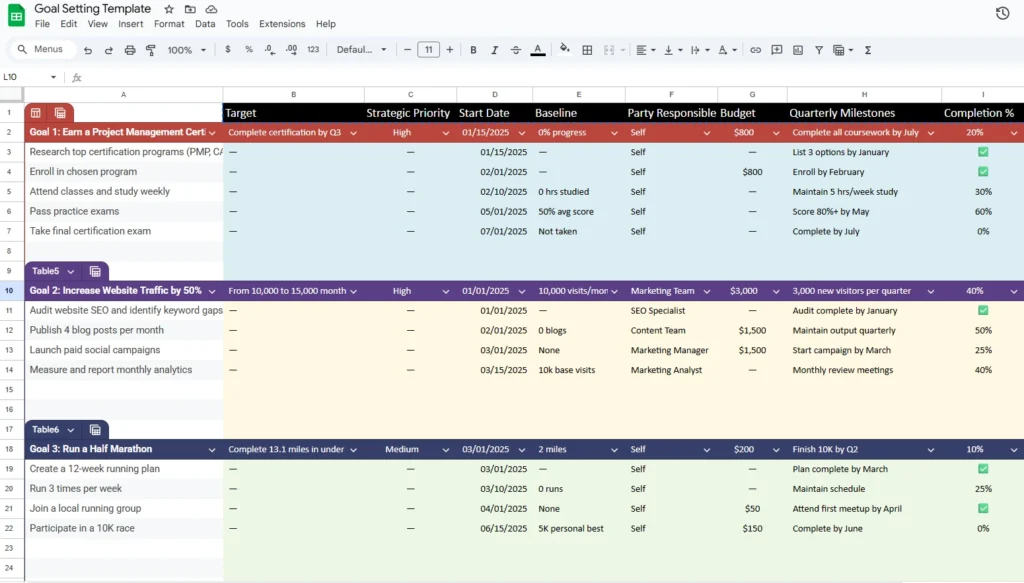
The template is laid out to mirror the way most people naturally think about their goals — starting broad, then breaking them into smaller, more specific steps. Each goal section includes rows for your main objective followed by several supporting actions. The design uses color coding to separate different goals, making it easy to scan multiple objectives at once.
For example, Goal 1 in the sample spreadsheet focuses on earning a Project Management Certification. The header row summarizes the entire objective in a single line:
- Target: Complete certification by Q3
- Strategic Priority: High
- Start Date: 01/15/2025
- Baseline: 0% progress
- Party Responsible: Self
- Budget: $800
- Quarterly Milestones: Complete all coursework by July
- Completion %: 20%
This single line gives a snapshot of your plan — what the target is, who owns it, and how far along you are. Below the main goal, the template provides clearly defined sub-rows like Research top certification programs, Enroll in chosen program, Attend classes weekly, and Take final exam. Each subtask includes its own start date, milestone, and progress column, making it easy to stay accountable week to week.
By combining visual organization with practical structure, the template gives you the clarity of a professional goal-tracking dashboard — without the complexity of specialized project management software.
Key Features and Sections Explained
The spreadsheet is divided into several key sections that make tracking both simple and meaningful. Each column serves a specific purpose and works together to give you a complete overview of your performance.
1. Goals and Action Steps
This is the foundation of the template. It’s where you list your high-level goals (like “Earn a Project Management Certification”) and then add detailed action steps (such as “Enroll in program” or “Pass practice exams”). By nesting smaller actions under each main goal, you turn large ambitions into manageable steps.
2. Target and Strategic Priority
The “Target” column defines what success looks like — for example, “From 10,000 to 15,000 monthly visitors” or “Complete 13.1 miles under 2 hours.” The “Strategic Priority” column lets you assign a High, Medium, or Low priority, helping you focus on what truly matters and avoid spreading effort too thin.
3. Start Date and Baseline
These two columns establish the timeline and starting metrics. Whether your baseline is “0% progress,” “10K visits/month,” or “2 miles,” you can easily measure growth over time. It’s ideal for people who want a clear before-and-after record of improvement.
4. Party Responsible and Budget
Not all goals are solo efforts. The spreadsheet includes a “Party Responsible” column so you can assign accountability — to yourself, a teammate, or a department. The “Budget” column helps you allocate financial or resource commitments directly alongside your tasks, providing transparency and better planning.
5. Quarterly Milestones and Completion Percentage
These two columns turn tracking into motivation. You can break each goal into quarterly checkpoints — like “Finish 10K by Q2” — and use the “Completion %” column to update progress regularly. Conditional formatting can be added to color-code progress, turning your sheet into a live visual tracker.
This combination of structured information and flexible customization makes the template more powerful than a typical goal planner. Every section encourages focus, accountability, and measurable results.
How to Use the Template Effectively
The Setting Goals Template is built to be both intuitive and adaptable. Here’s a simple step-by-step way to make the most of it.
Step 1: Duplicate and Customize
Start by opening the Google Sheets version and making your own copy. Rename it with the year or your project name — for example, “2025 Personal Goals Tracker” or “Marketing Department Objectives.”
Step 2: Define Your Goals
In each main row (Goal 1, Goal 2, Goal 3), write your top-level objective. You can follow the included examples or replace them entirely with your own. For instance:
- Goal 1: Earn a Professional Certification
- Goal 2: Increase Website Traffic by 50%
- Goal 3: Run a Half Marathon
Step 3: Add Subtasks and Dates
Fill in the smaller action steps that will help you reach each goal. Assign start dates to keep momentum and use the milestone column to schedule smaller checkpoints. These rows act like your personal progress log, giving structure to each week or month.
Step 4: Assign Responsibility and Budget
If you’re working with a team, assign each action step to a specific person or department. Add a budget if relevant — even small allocations like $50 for a fitness event or $1,500 for a marketing campaign help you stay financially organized.
Step 5: Track and Review Progress
Update the “Completion %” regularly to reflect real progress. For example, as you complete blog posts or hit training goals, adjust the percentage to show movement. This visual feedback makes progress tangible and motivating.
You can also apply a simple color scale to the progress column so that low percentages show in red and completed goals in green — a great visual reinforcement that turns data into motivation.
Why This Template Is Worth Using
The Sheetrix Setting Goals Template stands out because it combines practical usability with professional-grade organization. It’s ideal for people who want a straightforward system that still feels powerful and data-driven.
- For individuals, it’s perfect for tracking personal growth, education, or health goals. You can visualize how consistent effort compounds over months.
- For managers and teams, it brings structure to strategic initiatives. Each department can set quarterly milestones, track budgets, and assign accountability in one shared document.
- For business owners, it becomes a lightweight alternative to expensive project management software, offering clarity and focus without unnecessary complexity.
Unlike a typical checklist, this spreadsheet gives you the ability to measure performance over time. The built-in examples — like pursuing certification, increasing web traffic, and training for a half marathon — show how flexible the layout is across very different goal types. You can use the same framework for personal development, sales targets, event planning, or team performance tracking.
The color-coded layout also keeps information easy to read, while the progress tracking columns give you instant insight into where attention is needed most. Whether you update it weekly or monthly, the sheet becomes a living record of growth and accountability.
Get Your Free Goal Setting Spreadsheet
- Free Template
- Fully Editable
- Instant Access
- Organize your information
How to Access Your Copy
- Enter your email for instant access
- Open the link we send you
- Start using the spreadsheet right away





