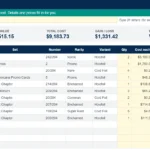
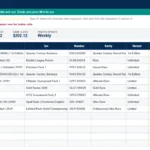
Running your own trucking business can be rewarding — but keeping track of every dollar in and out can feel like another full-time job. Between fuel receipts, maintenance bills, tolls, and permits, it’s easy to lose sight of how profitable each month truly is. That’s why we created this Owner Operator Trucking Expenses Spreadsheet — a powerful yet simple Google Sheets template designed specifically for independent truck drivers and small fleet owners.
With this free spreadsheet, you can manage income, expenses, and profit all in one organized dashboard. Whether you’re tracking one rig or a few, it gives you instant visibility into your cost per mile, net profit, and expense breakdown without complicated software.
💡 What Is an Owner Operator Trucking Expenses Spreadsheet?
An owner operator trucking expenses spreadsheet is a customizable tracking tool built in Google Sheets that helps truckers monitor income from loads, fuel purchases, maintenance costs, and other operating expenses. Unlike basic logbooks, this template automatically calculates totals, generates monthly summaries, and provides charts to help you understand where your money is going.
This version is fully compatible with Google Sheets — so you can access it from anywhere, share it with your accountant, and update it from your phone or tablet on the road.
🚛 Why Every Owner Operator Needs an Expense Spreadsheet
Tracking expenses manually or relying on paper logs often leads to missed deductions, inconsistent reporting, and headaches during tax season. A digital spreadsheet makes record-keeping simple and consistent. Here’s what it helps you do:
- Track every expense category automatically – fuel, maintenance, insurance, permits, meals, tolls, and more.
- Record your income per load or trip – including miles, rate per mile, and client details.
- See your real-time profit margin – instantly view how much you’re actually making after expenses.
- Prepare for tax season – organized categories make it easy to hand off data to your accountant.
- Identify high-cost areas – spot trends like rising fuel costs or frequent repair expenses before they impact profitability.
📊 Inside the Template
The spreadsheet includes five main sheets, each built to simplify your record-keeping:
1. Dashboard
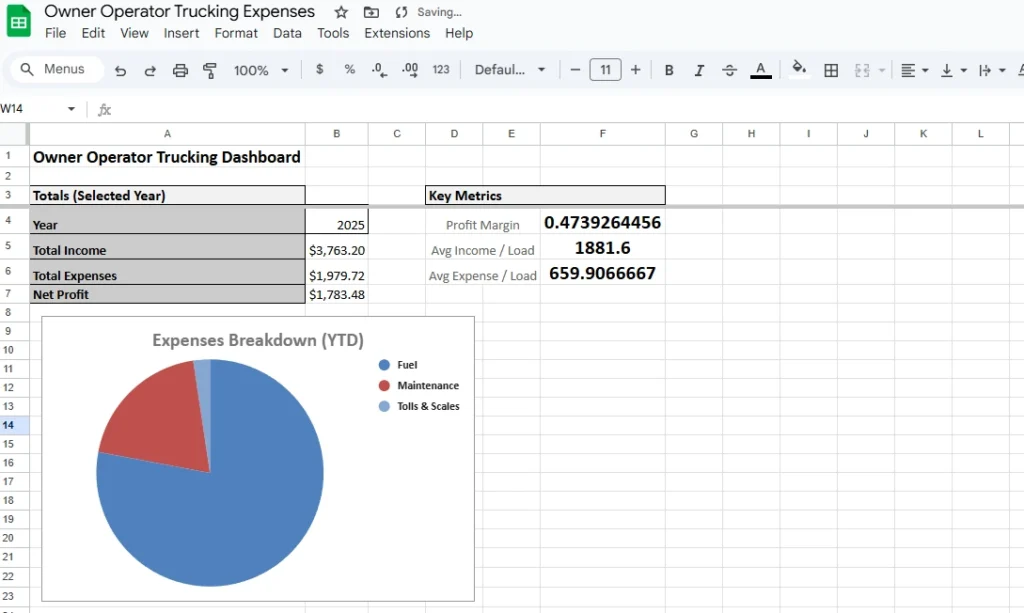
Your one-page business overview. See your total income, total expenses, and net profit for the selected year, plus cost per mile, revenue per mile and profit per mile, and a pie chart of expenses by category. It automatically updates as you log data.
2. Income Tracker
Log every haul or delivery. Track:
- Date
- Load/Trip ID
- Client Name
- Origin and Destination
- Miles Driven
- Rate per Mile (auto-calculates Total Income)
- Notes (for freight type, payment status, or details)
The sheet automatically computes total revenue and adds helper columns for Month and Year, allowing easy monthly reporting.
3. Expense Tracker
A detailed log for every cost your business incurs. Choose from dropdowns for:
- Expense Category (Fuel, Maintenance, Insurance, etc.)
- Payment Method (Cash, Card, ACH, etc.)
- Vendor
- Amount
- Optional link to receipts or invoices
Each entry automatically links to your monthly and yearly summaries.
4. Summary Report
A clean monthly breakdown of:
- Total Income
- Total Expenses
- Net Profit
- Fuel Cost % and Maintenance %
This section includes an auto-updating monthly profit chart and an expenses-by-category table that show your profit and where your money goes, helping you make data-driven decisions throughout the year.
5. ReadMe & Data Lists
Instructions and built-in dropdown lists for categories and payment methods.
🧮 Key Features and Formulas
This spreadsheet includes automated formulas for easy tracking:
- Total Income:
=SUM(Income!H2:H) - Total Expenses:
=SUM(Expenses!F2:F) - Net Profit:
=Income_Total - Expense_Total - Cost per Mile:
=Total_Expenses / (Loaded_Miles + Deadhead_Miles) - Fuel % of Expenses:
=SUMIFS(...)/Total_Expenses - Dynamic Charts: Pie and column charts update automatically
Totals, summaries and charts update automatically as you log loads and expenses.
💼 Benefits of Using This Template
- Saves Time: Log trips and expenses in seconds instead of hours.
- Reduces Errors: Built-in formulas prevent double-counting or misentries.
- Accessible Anywhere: Use it online or offline in Google Sheets.
- Tax Ready: Organized categories make it easy to hand your records to an accountant.
- Customizable: Add your own categories or company logo for branding.
This sheet gives you the financial visibility of trucking management software without the monthly fees — ideal for independent operators who want full control over their data.
⚙️ How to Use the Spreadsheet
- Get your copy: enter your email below, open the link we send you and choose Make a copy.
- Open it in Google Sheets from your Google Drive.
- Log your income in the “Income” tab each time you complete a load.
- Record your expenses in the “Expenses” tab as they occur.
- The Dashboard and Summary tabs will automatically update to show totals, monthly trends, and profit/loss data.
You can also share the file with your accountant or business partner with “view-only” or “edit” permissions.
💵 Typical Expense Categories Covered
- Fuel
- Maintenance
- Repairs
- Insurance
- Permits & Licenses
- Tires
- Tolls & Scales
- Lodging & Meals
- Office/Admin
- Parking
- Truck Payment
- Trailer Rental/Lease
- IFTA/Taxes
- Safety/Compliance
- Phone/Internet
- Other
Each of these is pre-loaded into the expense dropdown for consistent data entry. The Lists tab holds the dropdown lists, so you can rename categories or add new ones.
🧭 Pro Tips for Owner Operators
- Track by load, not just by month: This gives you profit per mile on the Dashboard and lets you filter loads by client.
- Add receipt links: Upload images of receipts to Google Drive and paste share links in the “Receipt” column.
- Review trends monthly: Look for spikes in maintenance or fuel usage.
- Back up your file: Save a copy each quarter for historical comparison.
- Use filters: Sort by vendor or category to see where your biggest expenses occur.
Owner Operator Expense Sheet or Trucking Accounting Spreadsheet?
People search for this tool by many names: an owner operator expense sheet, a truck driver expenses worksheet or a simple trucking accounting spreadsheet. This template covers the basics for all of them: income by load, expenses by category and a monthly profit summary with charts. It is a record-keeping tool for your own books, so check deductions with your accountant.
Owner Operator Expense Spreadsheet FAQ
Is the owner operator expense spreadsheet free?
Yes. It is a free Google Sheets template. Enter your email to get the link, then choose Make a copy to save your own editable version to Google Drive.
What can I track with it?
Income by load (load or trip ID, client, origin and destination, miles driven and rate per mile) and expenses by category, payment method and vendor. The Dashboard shows total income, total expenses, net profit, profit margin and cost, revenue and profit per mile. The Summary Report adds monthly fuel cost % and maintenance %.
Does it calculate cost per mile?
Yes. The Dashboard shows cost per mile, revenue per mile and profit per mile for the selected year. Cost per mile is total expenses divided by the miles you log on the Income tab, plus an optional entry for deadhead (empty) miles if you want to include them.
Does it track IFTA or per diem?
IFTA/Taxes and Lodging & Meals are expense categories you can log, but the template has no IFTA fuel-tax calculation or per-diem log.
Can I add my own expense categories?
Yes. The category and payment method dropdowns come from the Lists tab. Rename an entry or add new ones below the last one, up to 40 categories and 20 payment methods. The Summary category table and pie chart show the first 16 categories.
Can I share it with my accountant?
Yes. Use the Share button in Google Sheets to give your accountant or partner view-only or edit access.
Does it work in Excel?
It is built in Google Sheets. To use Excel, open your copy and choose File, then Download, then Microsoft Excel (.xlsx). Most formulas carry over, but charts and dropdowns can behave differently, so check your totals after downloading.
Get Your Free Owner Operator Trucking Expenses Spreadsheet
- Free Template
- Fully Editable
- Instant Access
- Organize your information
Log every mile for deductions with the free mileage tracker spreadsheet.
Stay ahead of repairs with the vehicle maintenance log.
At filing time, the tax expense spreadsheet keeps deductions organized.
How to Access Your Copy
- Enter your email for instant access
- Open the link we send you
- Start using the spreadsheet right away