Do you know how many people you have matched with this month? How many dates you have been on, and which ones you would actually repeat? A dating tracker spreadsheet built in Google Sheets can answer all of that in a few seconds.
Dating gets hard to keep straight fast. Between a few apps, a couple of conversations that fizzled, and a second date you meant to plan, details slip. This free template gives you one private place to log every match, record each date, rate how it went, and see where things stand.
It also covers the part many trackers miss: going out with the same person more than once. Log as many dates as you like for one person and the tracker keeps count for you. Below is everything the template includes and how to use it.
Overview of the Template
This dating tracker spreadsheet has four tabs: Start Here, Tracker, Date Log, and Summary. You add people on the Tracker and dates on the Date Log. Everything else is calculated for you.
The template is a good fit if you want to:
- Keep every match in one place, whichever app or place you met them
- See where each person stands, from Matched to Exclusive
- Log several dates with the same person without extra setup
- Rate your dates and see which ones you would repeat
- Check your totals and match to date rate on one summary page
Key Features and Sections
Tracker (Main List)
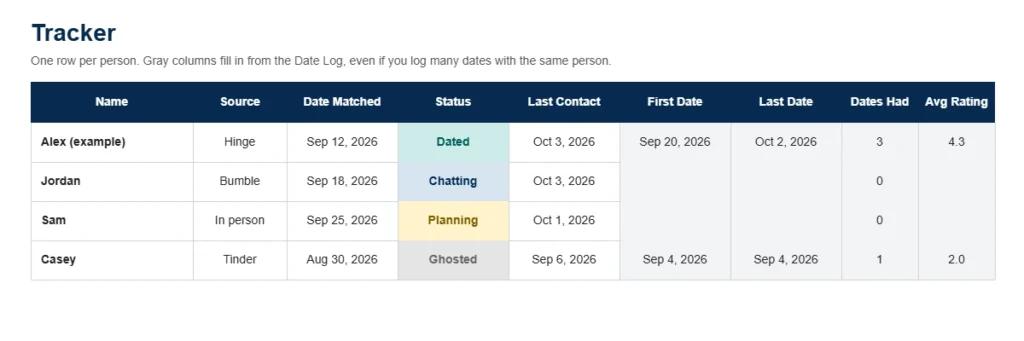
The Tracker has one row per person. Enter the name, where you met, the date you matched, and a status from the dropdown. Statuses are color coded: Matched, Chatting, Planning, Dated, Second Date, Exclusive, Ghosted, and Ended. There is room for 30 people, plus a Notes column for anything you want to remember.
The gray columns fill in on their own from your Date Log: first date, last date, number of dates, and average rating.
Date Log
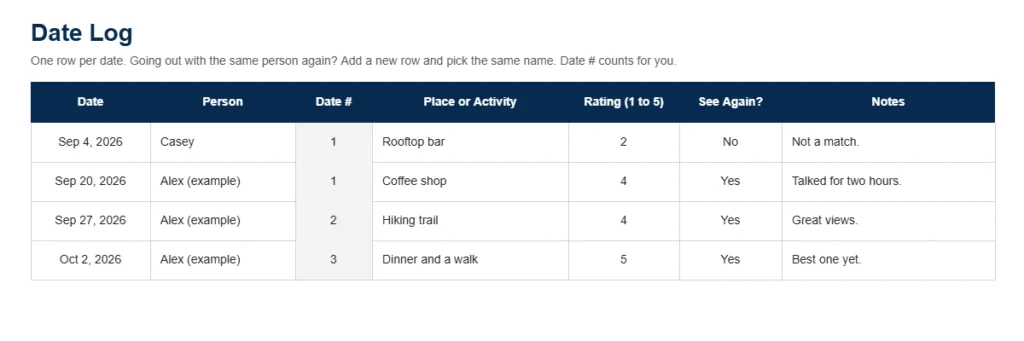
Add a row each time you go on a date. Pick the person from the dropdown, add the place or activity, rate the date from 1 to 5, and mark whether you would see them again. The Date Log has room for 60 dates. A Date # column numbers each person’s dates for you (1, 2, 3 and so on).
Summary
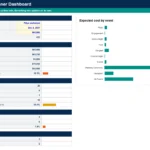
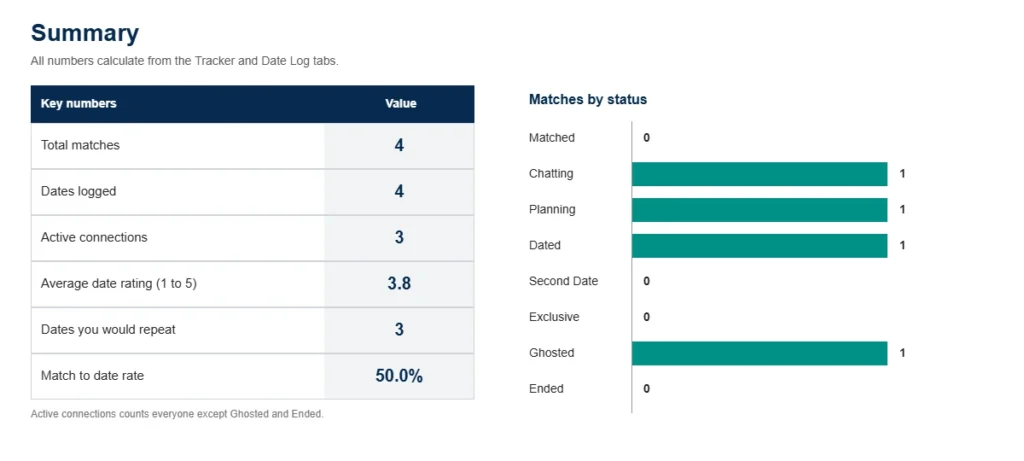
The Summary tab shows total matches, dates logged, active connections, your average date rating, how many dates you would repeat, and your match to date rate. A bar chart shows matches by status, and a table counts matches by source: Hinge, Bumble, Tinder, other apps, in person, friend intros, and other.
How to Use the Template
Step 1: Make Your Copy
Download the template, open the link, and choose Make a copy to save it to your own Google Drive. Your copy is private to you.
Step 2: Clear the Example Rows
The first row on the Tracker and the first two rows on the Date Log hold example entries for Alex. Type over them or delete the text in the white cells. Leave the gray formula cells alone.
Step 3: Add Your Matches
On the Tracker tab, enter each person’s name, pick the source and status from the dropdowns, and add the date you matched. Update the status as things change.
Step 4: Log Your Dates
On the Date Log tab, add one row per date. Pick the person from the dropdown, then add the place, a rating, and whether you would see them again.
Step 5: Check Your Summary
Open the Summary tab to see your totals, average rating, and status chart. The numbers update every time you add a person or a date.
Logging Multiple Dates With the Same Person
You do not need a new Tracker row for a second or third date. Keep one row per person on the Tracker, and add one row per date on the Date Log.
To add another date, go to the Date Log, add a new row, and pick the same name from the Person dropdown. The Date # column shows which date it is for that person. Back on the Tracker, that person’s first date, last date, number of dates, and average rating update automatically.
For example, if you meet Alex for coffee, a hike, and dinner, you add three rows on the Date Log with Alex’s name. The Tracker then shows 3 dates, the first and last date, and the average of the three ratings.
Why Choose This Template
Built for Real Dating Life
The sources, statuses, and ratings match how people actually date, including ghosting and ending things.
Automatic Calculations
Counts, averages, and dates fill in from your entries, so you only type each detail once.
Private and Easy to Edit
The template lives in your own Google Drive. Nothing is sent anywhere, and you can edit the dropdown lists to fit your own way of dating.
Free and Works in Google Sheets
The template is free and works in Google Sheets on your phone or computer.
Tips for Best Results
- Update a person’s status whenever things change, so the Summary stays accurate.
- Rate a date soon after it happens, while you still remember how it felt.
- Use the Notes columns for small details like favorite food or plans you made.
- Spell each name the same way every time, since the Date Log dropdown pulls names from the Tracker.
Who Should Use This Template?
People Using Several Dating Apps
If you are on more than one app, the Source column and the Summary tab show where your matches come from.
Anyone Who Wants to Spot Patterns
Ratings and the See Again column make it easy to notice what kinds of dates and people you enjoy most.
Busy People Who Forget Details
Notes, last contact dates, and statuses help you pick up a conversation without having to scroll back through your chats.
Frequently Asked Questions
Can I log more than one date with the same person?
Yes. Add a new row on the Date Log for each date and pick the same name from the dropdown. The Tracker counts every date and shows the first, last, and average rating.
How many people and dates can I track?
The Tracker has room for 30 people and the Date Log has room for 60 dates. When you reach the limit, make a fresh copy or clear out old entries.
Can I change the statuses or sources?
Yes. Select the column, open Data, then Data validation, and edit the list. If you rename a status or source, update the matching label on the Summary tab so the counts still work.
Is my information private?
Yes. When you make a copy, the file lives in your own Google Drive and only you can see it unless you share it.
Does it work in Excel?
The template is built for Google Sheets. You can download it as an Excel file from the File menu, though dropdowns and formulas may behave a little differently.
Download Your Free Dating Tracker Spreadsheet
- Free Template
- Fully Editable
- Instant Access
- Log multiple dates per person
Inside the template: Start Here, Tracker, Date Log, and Summary tabs.
How to Access Your Copy
- Enter your email for instant access
- Open the link we send you
- Start using the spreadsheet right away