If you run an Airbnb and keep your books in Microsoft Excel, this free Airbnb Excel spreadsheet gives you a ready-made income and expense tracker. Log each booking and each cost, and a yearly view shows your income, expenses by category and net income for every property, month by month. There are no macros or add-ins.
It is the Excel version of our Airbnb income and expense tracker for Google Sheets, rebuilt as a native .xlsx file that works offline. Not hosting yet and want to check the numbers first? Try the Airbnb calculator spreadsheet.
What You Get
- An income table for bookings, with date, property, booking ID, guest name, notes, nights and total income.
- An expense table with date, property, category, description and cost.
- A Yearly View that totals bookings, nights, gross income, expenses by category and net income for any property and year you pick.
- A Year total column on every row, so you see the full-year figure as well as each month.
- Dropdowns for property and expense category, so your data stays consistent.
- Room for 5 properties and 10 expense types, plus about 1,000 rows of bookings and of expenses.
Inside the Excel Template
The workbook has five tabs: Yearly View, Income & Expenses, Categories, Info and Feedback. You enter data on two of them and read the results on the third.
Categories Tab
Start here. Type your properties, up to five, and your expense types, up to ten, such as cleaning, supplies, maintenance, utilities and Airbnb service fees. These lists feed the dropdowns on the other tabs. The Years column fills itself from the dates you enter, so you never maintain it by hand.
Income & Expenses Tab
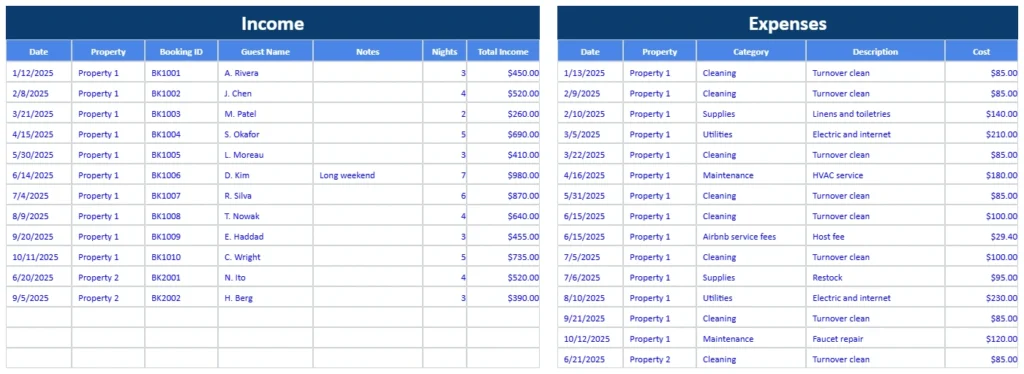
Bookings go in the table on the left and costs go in the table on the right. Pick the property from a dropdown, and for expenses pick the category too. The sheet reads real dates, so type them the way your Excel expects, for example 3/15/2025.
Yearly View Tab
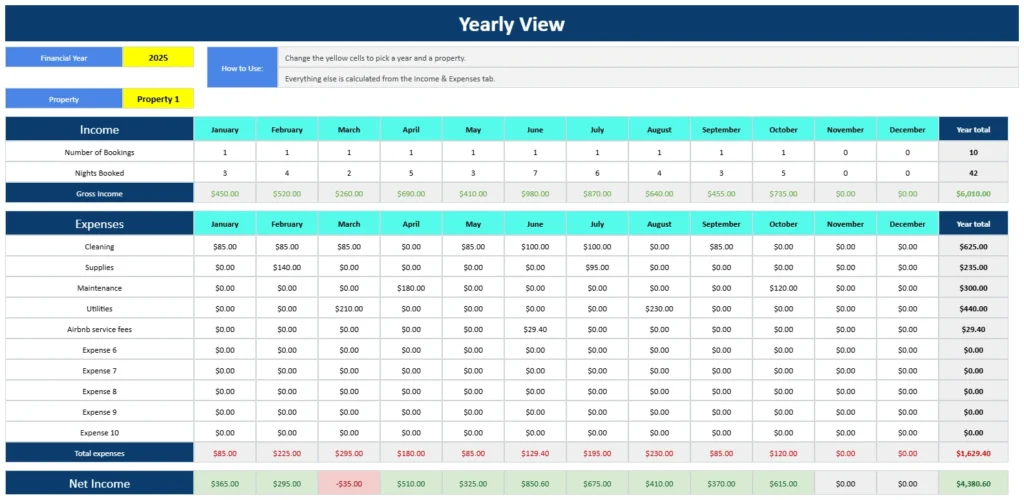
Choose a financial year and a property in the two yellow cells. The sheet then shows, for each month, the number of bookings, the nights booked and your gross income, followed by every expense category and your total expenses. The Net Income row turns green when a month is profitable and red when it is not. The last column adds up the year.
Airbnb Spreadsheet Example
The template opens with sample bookings and costs for 2025 so you can see how the Yearly View works. For Property 1 it shows:
| 2025, Property 1 | Total |
|---|---|
| Bookings | 10 |
| Nights booked | 42 |
| Gross income | $6,010.00 |
| Total expenses | $1,629.40 |
| Net income | $4,380.60 |
March is the only loss: $260.00 of income against $295.00 of expenses, so that month is highlighted in red. Delete the blue sample rows when you start entering your own data.
How to Use the Airbnb Spreadsheet in Excel
- Download the file. Enter your email below and use the link we send you to get the .xlsx workbook.
- Set up Categories. Replace the sample property and expense names with your own.
- Log your bookings on the left of the Income & Expenses tab, one row per stay.
- Log your expenses on the right, choosing a property and a category for each cost.
- Open the Yearly View and pick a year and a property to see your results.
- Repeat as you add data. Everything recalculates by itself.
Excel Version or Google Sheets Version?
| Excel version | Google Sheets version | |
|---|---|---|
| File | A .xlsx file you download | A Google Sheet you make a copy of |
| Offline | Works offline in Excel | Needs a connection unless Drive offline mode is on |
| Year total column | Yes | No |
| Years list | Fills itself from your dates | Fills itself from your dates |
| Sharing | Send the file | Share a link |
Both versions have the same tabs and the same Yearly View. Use the Google Sheets version if you prefer to work in your browser.
Built With Standard Excel Features
The workbook uses ordinary functions such as SUMIFS, COUNTIFS and DATE, plus dropdown lists. It needs no macros, add-ins or Microsoft 365 features, and month boundaries are built from real dates, so it behaves the same whatever regional settings your Excel uses.
Airbnb Excel Spreadsheet FAQ
Is this Airbnb Excel spreadsheet free?
Yes. Enter your email and we send you a link to download the .xlsx file. There is no charge and no account is needed.
How do I add my own properties and expense categories?
Open the Categories tab and replace the sample names. You can list up to 5 properties and 10 expense types. They appear in the dropdowns on the Income & Expenses tab and in the Yearly View.
How do I see a different year or property?
On the Yearly View, change the Financial Year or Property in the yellow cells. The year list fills itself from the dates in your data.
Why does my Yearly View show zeros?
Check that the year and property in the yellow cells match your entries, that the property names are spelled the same way, and that your dates are real dates rather than text. Typing a date such as 3/15/2025 in your usual format works.
How many bookings and expenses can I log?
About 1,000 rows in each table, which is several years of activity for most hosts.
Can I use it for Vrbo or Booking.com stays?
Yes. The sheet only needs a property, a date, nights and amounts, so it works for any short-term rental platform.
Does it calculate occupancy, ROI or cash flow?
No. It tracks income and expenses. To estimate cash flow, return and break-even occupancy before you commit, use the free Airbnb calculator spreadsheet.
Can I use it in Google Sheets?
You can upload the file to Google Drive and open it in Google Sheets, but we also have a version built for Google Sheets. See the Airbnb income and expense tracker.
Will this help with taxes?
It keeps your income and expenses sorted by property, category and month, which makes year-end bookkeeping easier. It is a record-keeping tool, not tax advice, so check deductions with a tax professional.
Get Your Free Airbnb Excel Spreadsheet
- Free Template
- Fully Editable
- Instant Access
- Works offline in Excel
Want to run the numbers before you buy? Use the Airbnb calculator spreadsheet.
How to Access Your Copy
- Enter your email for instant access
- Open the link we send you
- Start using the spreadsheet right away
Keep your bookings and costs in one workbook, and the Yearly View will tell you at a glance which months and which properties are earning.